





The days are gone when a physical storefront or a website was enough to guarantee your brand’s local dominance. In today’s highly competitive digital era, a majority of consumers rely heavily on Google Maps to find local businesses. So, no matter how large your enterprise is, if your brand lacks a significant local presence, you may lose a large number of your potential local customers. To grab the instant attention of your local prospects, you need to make your brand appear in Google Maps’ local 3-pack, which can only be possible with effective Google Maps marketing strategies.
According to a WiserReview survey, 80% of U.S. consumers search for local businesses weekly. As over a billion people use Google Maps to find anything from a coffee shop to emergency healthcare services, and no matter how large your enterprise is, you may lose a large number of your potential local customers if your brand lacks a significant local presence.
Let’s unfold the secret of how brands can leverage an effective marketing strategy plan to rank in Google Maps and make their brand the one-stop destination for local prospects.
What Is Google Maps Marketing?
As the name implies, it is marketing your business through Google Maps. It is about optimizing a brand’s local presence, specifically its presence on Google Maps, to increase its visibility in local searches.
In other words, it is a tactic of employing Google Maps marketing’ functionality to make your business easier to find when potential customers search for your products or services. Additionally, it serves as an indispensable tool for businesses to target local customers.
Still confused? Let’s understand it with an example:
For example, you search for a ‘Chinese restaurant in Florida,’ and a restaurant named Kim Wu Chinese Restaurant is the top result in Google Maps that comes right after the search box. You can get to see complete information about this restaurant—location, address, phone number, directions, etc.
What’s more, you can read reviews, you can check the menu, and you can place an order online. People who are searching for Chinese food will be more likely to visit the Kim Wu Restaurant online. And this is the power of Google Maps marketing. So, if you want your brand to appear in the top three results on Google Maps, you need to get the marketing done for Google Maps correctly.
Who can benefit from it? Businesses with a physical storefront or service-area brands can drive exceptional foot traffic and inquiries by capturing consumers actively looking for nearby solutions to their unique needs.
Objective of it: Needless to say, listings (Google Maps Local 3-Pack) on Google Maps results when someone googles with the relevant keywords.
Two Major Types of Local Business Listings on Google Maps
Brands can get two major types of listings on Google Maps and appear for the same with a top ranking. You can ensure the ultimate success of local customer acquisition through prominent and accurate Google Maps marketing. Let’s have a clear idea of these two major types of Google Maps listings:
- Local Google Map Results (Proximity Based)
These are the proximity-based Google Maps results that are the most common. When you have location data enabled, Google Maps suggests local businesses nearest to you. These results are highly visible results that appear at the top of Google Search (specifically, in the local map pack).
Do you know that 44% of local searches are more likely to click on Google’s local 3-pack? Appearing in the top 3 results of Google Maps marketing can help you target the right audience base. You can also come across these results in the default view of the Google Maps app when you can search for broad services.
The Core Factor: Distance is the primary ranking signal in the local Google Maps results. Google tends to show searchers the closest brands that match the user query. So, when a user searches for a service provider in a specific location, the map pins showcase businesses within a short radius of that specific location.
- Ranked Google Map Results
Though proximity-based results are the most common, not everyone has Google location data activated on their devices. When you turn off location data on your mobile phone, you get these different results purely based on the optimization of business listings.
The Core Factor: In these results, these brands appear when a user zooms out on the map and actively browses a broader region. When someone clicks on the ‘More Places’ or ‘Local Finder’ button, these Google Maps results show. Google generally shifts weight from proximity to prominence and relevance.
As a business owner, you should strategically optimize your Google business listing so that your business can rank for both kinds of results.
Why Does Your Business Need Google Maps Marketing?
When your potential customers find you in the top 3 results on Google Maps, it becomes more likely that they will contact you. From helping brands to attract local prospects to building customer trust, marketing for Google Maps offers a list of benefits.
Here is a list of the top 6 reasons why businesses must focus on local Google Maps marketing to achieve these benefits:
- Able to Catch Local Audience
Gone are the days when buyers used to visit shops directly and buy things.
Now, they search online for product information, compare prices, and search for deals/promotions. With this marketing, your business can come in the top 3 results on Google Maps. This simply means you can effectively catch the local audience in your area.
- Increase Brand Visibility
As mentioned earlier, buyers search online before making purchase decisions.
Imagine your business featuring on Google Maps when potential customers search with a related keyword. Don’t you think this will boost the visibility of your business? Yes, it will definitely do. If used effectively, Google Maps SEO is an excellent tool for increasing brand visibility.
- Build Potential Customers’ Trust
When somebody wants to buy something, they turn to Google and search. If your business comes in the top three results on Google Maps, it leaves an impression that you are a trusted company. Also, buyers can get complete information from there even before visiting your physical location. This will make them feel that you care for them. Marketing is extremely helpful in building trust.
- Cost Effectiveness
Online Google Maps marketing is an economical way of advertising. But the best thing about it is that you can promote your business to those people who are looking for the products or services you offer. What’s more, you promote your business to those ready-to-buy people who are in your proximity. This simply means more sales.
- Boost Conversion Rate
It increases the visibility of your brand, builds trust, and targets the local market. All of these factors contribute to increasing the conversion rate. And the best part: you don’t have to break the bank to boost the conversion rate.
- Actionable Convenience
A brand owner needs to create and optimize their Google Business Profile so that Google Maps can provide instant access to their business address, operating hours, and an actionable CTA that guides consumers to make a phone call. It allows specifically mobile users to immediately take a desired action.
A Complete Strategy Guide for Google Maps Marketing: Best Strategies to Get Featured in Google Maps
Now it’s time for you to follow a complete strategy guide to implement Google Maps marketing to ensure you appear in Google Maps search results.
Yes, it requires you to follow a strategic approach. In this section, we have explored how brands can effectively get their businesses featured in the Google local map pack:
Strategy 1: Create and Optimize Your Google Business Profile
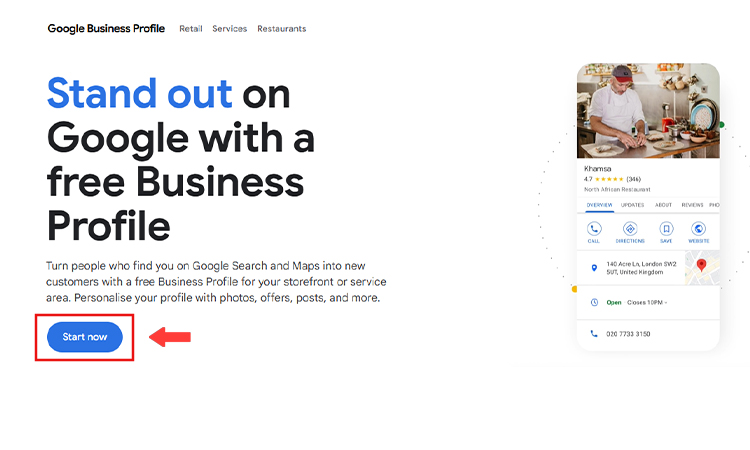
The first thing brands need to ensure is to have a well-optimized Google Business Profile (GBP) with accurate and updated contact information.
To own your business presence on Google and make your business easily found by your local prospects. Here’s a quick step-by-step guide to seamless GBP profile creation and optimization:
Step 1—Navigate to Google Business Profile and Claim Your Business
You need to navigate to the official Google Business Profile page. Then, you need to search to find your business on GBP, whether it exists or not. If it does, you need to click on ‘Claim this business,’ and if not, you can select ‘Add your business to Google.’ Then a screen will appear, where you can select whether you have a physical storefront or own a service-area business.
Step 2 – Add Accurate, USPS-Approved Address Information
You must fill in the accurate details of your business, including the business name, address, and phone number. While entering these details, you need to be extra careful to ensure you have filled out the accurate business information.
Now, you must be thinking about how you can go wrong when entering address information. Though it seems an easy task to enter address information, many businesses do it incorrectly.
When you are going to add address information to your Google Business Profile, you should make sure that you use the USPS-approved address (or any other postal service applicable to the area where your business operates).
Also, there is an option in the Google Business Profile account to display or not to display address information. It is recommended that you choose to display address information.
The more data you give to Google, the better it will be for Google Maps ranking.
Step 3 – Add Your Service Area
Adding your service area to Google Business Profile is very important for a high Google Maps ranking.
If you are serving many areas, you should include those areas in your Google Business Profile. Also, Google Business Profile allows business owners to set a serving distance (in miles or kilometers) for their businesses.
If you don’t serve at your physical location or you are a phone-only company, you should mention it. Otherwise, people might turn up at your physical location in the hope of being served, and they will write negative reviews after finding that you don’t serve at your physical location. However, this might affect your Google Maps ranking.
Step 4 – Get Your Google Business Profile Listing Verified
You need to complete the verification process for your GBP profile. When you verify your business after submitting all the details, it requires you to verify your business through a phone call, email, or by requesting a short video where you can showcase your location or equipment or provide business proof.
Verifying your GBP profile is crucial to boost your Google Maps marketing efforts. After adding the USPS-approved address and service areas to the Google Business Profile, the next step is to get the listing verified.
The verification process takes up to a few weeks.
The reason is that Google normally sends a postcard with a unique PIN to the physical address that you listed in your Google Business Profile in order to confirm verification.
For some businesses, Google allows email or phone verification as well.
Strategy 2: Optimize Images in Google Business Profile Listing
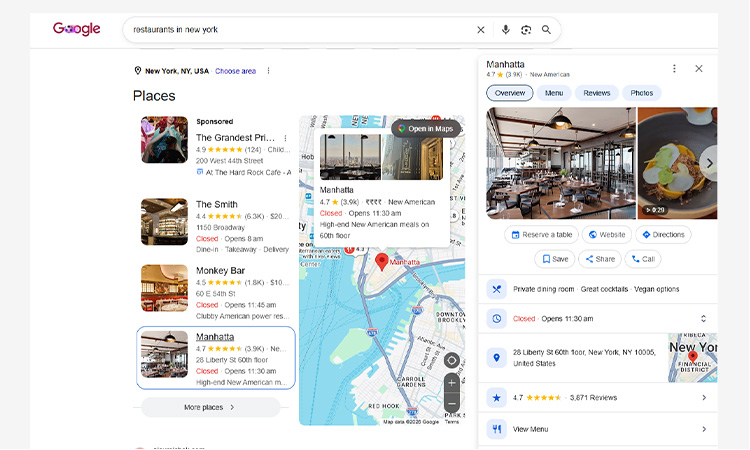
Google Maps, by its nature, is a visual platform. It is more than just a map.
Google Business Profile listings with relevant images are more eye-catching than those without images.
If you add high-quality, relevant images to your business listing, you will stand out.
If you decide to include images in your business listing, we suggest that you go for optimized images. Optimizing images for Google Business Profile can significantly improve your Google Maps ranking.
Adding metadata to your business images makes them easier to find. Want to know what metadata you should include to optimize images? Let’s have a look at the brief list:
- City and geographic location
- Keywords relevant to your business
- Physical address of your business
- Categorization information, if it applies
Strategy 3: Ensure All the Categories Relevant to Your Business
Many business men only fill the primary category when they are creating their Google Business Profile listing. You shouldn’t do it.
Make sure you have checked all the additional categories relevant to your business. Otherwise, you will miss out on your competitors. However, you should not add a category for each of your products.
Google itself has provided a guideline for adding a category. It says, “Select categories that complete the statement: ‘This business IS a’ rather than “this business HAS a.” “The goal is to describe your business holistically rather than a list of all the services it offers, products it sells, or amenities it features.”
Strategy 4: Post Frequently on Facebook Page and other Social Channels
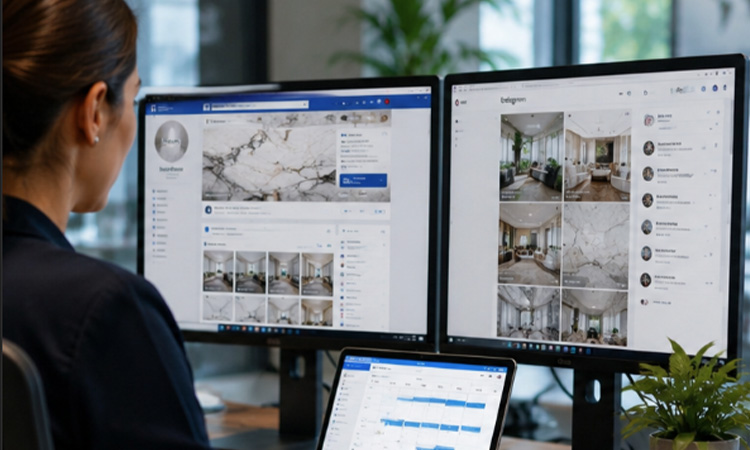
Frequently posting on Facebook and LinkedIn pages helps you maintain your consistency across all the social outlets.
A majority of businesses become super active when it comes to posting on the Facebook page and the LinkedIn page. Such posts are more likely to rank your business higher on Google Maps. Implement this strategy in your internal system by posting frequently on the social pages of your business if you want to rank high on Google Maps.
When your business is highly active on popular social platforms like Facebook and LinkedIn, it helps your brand to drive sales specifically from local prospects. The following are certain ideas to post on social channels:
- Local Event Marketing: You must consider promoting in-person or virtual events on your social media business pages to boost community engagement and encourage driving exceptional local foot traffic. Your local prospects will be more interested in learning about the events happening in their nearby area.
- User-generated Content: You can ask your customers to tag your business in their social media posts and share them with credit to build genuine trust. This user-generated content can help you build a robust following across your social media business pages.
- Google Business Profile Integration: You can use your GBP dashboard’s ‘Add Update’ feature to integrate it and its reviews into your social media business pages. Through this feature, you can share timely announcements, post limited-time offers, and announce local events through your business profile.
A Pro Tip for You! You should always ensure that your updates on Google Maps are completely action-oriented. Don’t forget to add a clear call-to-action (CTA), such as ‘Learn More’ or ‘Call Now,’ that points to your linked landing page.
Strategy 5: Ask Customers to Share Reviews on Google
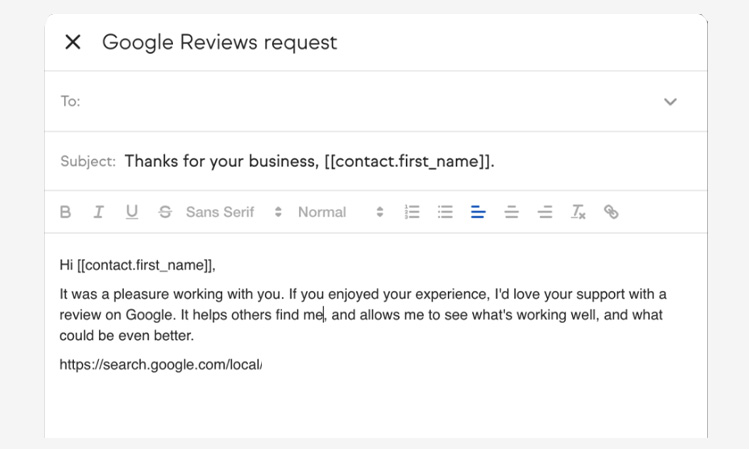
Though it’s not clear how big a role customer reviews play in Google Maps ranking, a Google Business Profile listing without customer reviews will face tough competition from businesses that have lots of reviews.
A 2023 PowerReviews study has claimed that 82% of consumers trust ratings and reviews as much as or more than recommendations from family members and friends. Generating online customer reviews is a must for your business. Without them, your business won’t be credible.
But how can you get customer reviews for your business?
The answer is simple – you should ask your customers to share their reviews regarding your business.
Customer reviews are one of the single most important ranking factors to appear for relevant local searches. The more reviews a brand has on its GBP profile, the more trust your brand can earn and the more opportunities you can get to rank your business among the top 3 results of Google Maps’ local pack.
Effective strategies to get more Google reviews require you to follow these steps:
- Firstly, you need to log in to your GBP profile and navigate to the ‘Reviews’ section. Here, you need to click on ‘Ask for Reviews’ to get the link. It will help you get a direct, low-friction URL that takes the visitors straight to the review pop-up.
- You need to embed the customized link in follow-up emails, CRM sequences, and CRM sequences shortly after a successful purchase or service completion.
- You must download the custom QR codes generated by Google’s dashboard. You can print the code on your physical receipts, business cards, and in-store displays to encourage customers to share on-the-spot reviews.
- You must consistently reply to every review you receive on your GBP profile, no matter whether they’re positive or negative. Always try to respond professionally and calmly to signal strong customer service from your company’s end.
Business reviews on Yelp, Yahoo Local, and any other similar services work as local citations, which complement your Google Maps marketing efforts.
Strategy 6: Optimize the Introduction of Google Business Profile Listing
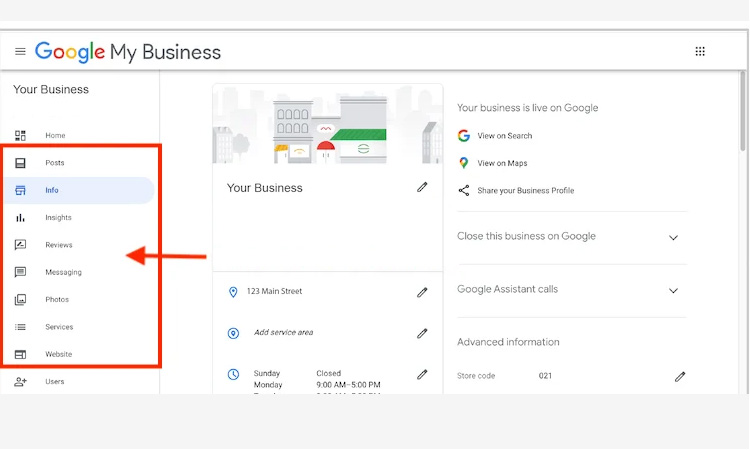
A Google Business Profile listing’s introduction plays an important role in Google Maps ranking. Many businessmen just provide basic information about their businesses. This is not a good practice.
You should optimize the introduction of your business listing. Consider including all the information that potential customers might want to know about your business. You must include what you do, where you are located, why you are the best, etc. By all means, you should try to include all the relevant keywords in the Google Business Profile introduction.
However, you should avoid cramming the introduction with keywords. Your main objective should be to write a crisp, catchy, and compelling introduction, having searchers in mind.
Here’s how you can optimize your GBP introduction:
- Prioritize the first 250 characters of your GBP description on the main search page, as this specific part is visible before a user clicks ‘More.’
- Always ensure adding the most critical selling points and implementing the core keywords right at the beginning.
- Never stuff keywords in these first 250 characters. Always ensure to include the primary services and location keywords to help the algorithm understand what your brand offers. Don’t forget to list off cities and services without any proper context, as it majorly violates Google’s business guidelines.
- We suggest that brands never include sales pitches, discounts, or call-to-action phrases in this section. Instead, you must use natural language to explain who you serve and what makes your brand unique among your market competitors. If your GBP introduction appears as an advertisement, Google may penalize your brand or even completely reject your description.
Strategy 7: Build High-quality Backlinks and Local Citations
Google’s algorithm considers links as trust votes. The more high-quality backlinks your website has, the better it will be for your business. Effective link-building strategies require you to partner with authoritative businesses to earn meaningful link-building opportunities.
High-quality link building will create an authority for your website, which will support Google Maps ranking.
Also, you should not miss any opportunity of getting local citations for your business from reputable bodies like the Better Business Bureau, the local chamber of commerce, or any other business association that matters.
Here are some other places where you can look for local citations:
- Local blogs
- Locally focused directories
- Industry-specific directories
Every local citation you earn for your business is helpful for local Google Maps marketing.
Strategy 8: Prioritize Optimizing Your Brand for Local SEO
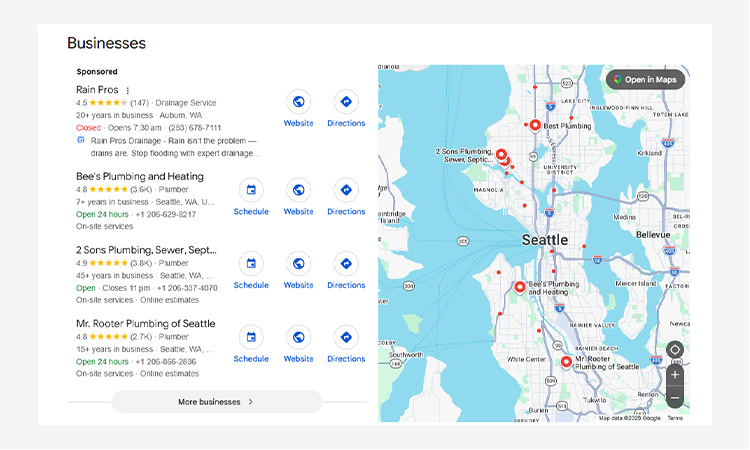
You must leverage Google Maps SEO for local businesses, especially if you have a physical storefront. It’s crucial for local customer acquisition through Google Maps, as it ensures driving an exceptional amount of foot traffic to your brand and strengthens your Google Maps marketing efforts.
Local SEO and Google Business Profile optimization serve as the foundational pillars of your brand’s visibility on Google Maps. Here’s how you can optimize your brand for local SEO, other than Google Business profile optimization:
- Website Visuals: You must consistently encourage your satisfied customers (especially the local ones) to share reviews with high-quality visual content, such as photos of their received products, video testimonials, brand-representative photos, product unboxing or service videos, and more. When customers from a specific location share visual feedback on Google, it will significantly boost your local SEO efforts.
- Website Optimization: Always ensure that your website’s content echoes your local SEO efforts. Don’t forget to uniformly add location-based keywords (for example, the ‘near me,’ ‘nearby,’ ‘in the city,’ or ‘near my location’ keywords) in your meta tags, body content, and headings across all the site pages.
- Leverage Google Posts: You can use GBP features to post fresh updates, deals, and upcoming events regularly. This feature will help you update your customers regarding all the latest events.
Local SEO can help you navigate the complexities of attracting local prospects and optimizing your brand presence to appear on Google Maps for local search queries.
Strategy 9: Run Google Maps Paid Ads
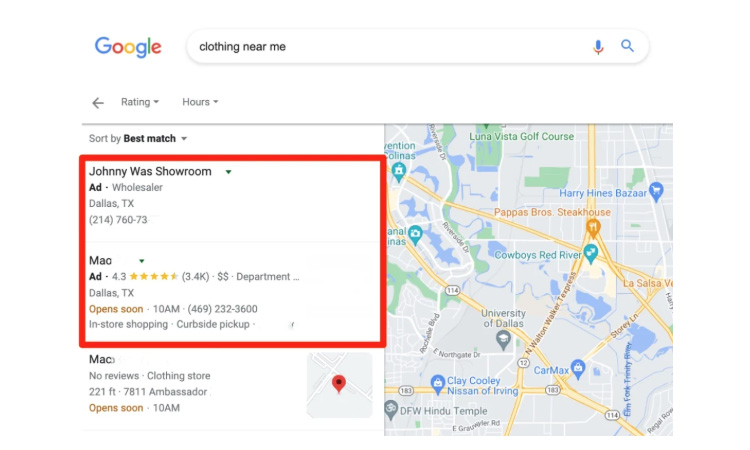
Google introduces a new range of features, which are Google Maps Ads. It allows businesses to promote their expertise and offerings on Google Maps.
Now, four paid-advertisement features are available on Google Maps:
- Promoted pins (they can be branding aspects and logos)
- Customizable business pages
- Local inventory and search function
- In-store promotions
These ads will appear on Google Maps results. When organic rankings are too competitive, or if you want your brand to dominate the search results of Google Maps, Google Ads provides premium visibility on the map.
Google Ads allow brands to show up as promoted pins on Google Maps. These brands can also appear on search results ads, autocomplete ads, and even placesheet ads.
How to set up Google Maps paid ads? You need to link your GBP profile to your Google Ads account to sync your brand’s physical store’s exact location data. Additionally, you need to run a Performance Max campaign with a local store visits objective, set your daily budget, and refine your audience to specific cities or a radius around your physical store.
Always ensure that you have enabled location assets in your ad account so that the nearby searchers can easily find and route to your business.
Strategy 10: Measure the Success of Your Google Maps Marketing Strategies
Have your marketing efforts translated into your desired revenue?
To get the answer, you need to continually monitor the performance of your efforts to rank in Google Maps marketing and adapt your strategies based on data. Here, we have mentioned some key performance indicators (KPIs) to measure your marketing success.
KPIs to Track:
- Clicks for directions
- Website visits
- Mobile click-to-calls
- Ad performance
- Return on Ad Spend (ROAS)
- Store visits within a specific time period
- Local prospects’ actions
- Keyword grid reports
Conclusion
If your business comes in the top 3 Google Maps results, this helps build trust, draws locals, increases brand visibility, and boosts conversion rates. You can make your brand prominently visible online and encourage your local prospects to choose your business over your market competitors.
We hope that our complete guide to Google Maps marketing will help you navigate this complex process and achieve a top ranking on Google Maps for your business.
Still have a doubt whether you should invest in these online marketing strategies for ranking in Google Maps or not? Consult with a reliable digital marketing agency to seek their professional assistance and expert guidance.
FAQs
Ans. This is an AI-driven feature on Google Maps that allows users to ask specific and real-world conversational questions. Brands must maintain an accurate profile and collect a high number of positive reviews to ensure their brand appears on Google Maps recommendations. You need to have clear and question-answering content available on your site.
Ans. No, you cannot directly request or pay for a better local organic ranking on Google. The search algorithm kept it confidential to ensure a fair system across Google Maps. However, you can run paid advertisements, such as map search ads and promoted pins, through Google Ads to secure a prominent placement for your brand on the map.
Ans. Yes, it’s highly recommended to have a well-optimized website to finalize a customer acquisition or sale. It will offer you additional points to market your brand on Google Maps. But having a website is not mandatory to create a basic and free Google Business Profile or to be visible on Google Maps. If you want to prioritize Google Maps marketing, owning a robust website can help you to establish your brand’s ‘Prominence’ and ‘Relevance’’ in local search algorithms.
Ans. Yes, absolutely. Your Google Business profile with high-quality photos of your brand and physical store can drive more requests for directions. A majority of searchers are more likely to visit your business if your Google Business Profile features photos or virtual tours.
Ans. Google Maps ads mainly operate on a cost-per-click model. You need to only pay when a user clicks to get your location details, get directions, click-to-call, or click through to your website.


Amazing Guide, Thanks for sharing. This guide will be very useful for Me and any Website Marketers.
Glad you liked our blog post. I hope that all our readers will find it useful.
Hi Lalit,
That is a definitive post on Google Maps Marketing. Very useful and informative. Not only did you mention how to do it, but also what’s its importance.
Thanks a lot.
Hi Jhasketan,
Pleased to know that you liked this post. We always try our best to write a piece of blog that is well researched and is full of information.
Love the title of your blog. Are you developing more blogs like this? Would love to read more like this
glad to see u on this post
amazing
lalit sharma
Hey Lalit,
Thanks for sharing this valuable post.
I heard about google maps marketing for the first time through your blog that we can use this also for our businesses, and that too so efficiently.
Thanks again for provideing this info, keep writing new stuffs.
Glad that you found the post useful.
Hey Lalit,
Have you done some tests with the new Post feature of Google My Business ?
Do you think it could increase a page rankings ?
Thanks
Ben
Hi Benjamin,
That’s a good question!
Since it is a new feature, any comment on rankings will be too early. We have started trying it for some of our clients and just waiting to see something. As soon as we see something, we will update you.
Your post always motivates new bloggers like us. I have been following your blog since 4 month and now applying each and every method suggested here. Its really improving my results.
And thanks for all the guides with simple language.
your fan.
Hi Lalit,
thanks for the amazing post!!!
Glad I found the most precise step by step guide on Google Maps Marketing.
thank for sharing the knowledge.Thanks again
Hi Lalit
Thanks for providing this useful article. I can learn how to do google maps marketing details.
All the steps are very well explained and easy to understand! Great blog!
Really it’s an amazing and interesting write-up!
But, I have a question. If no area or location in target keyword so is it possible to get results in local searches? It would be great if you could clear this.
Hi Ash,
Yes, it is possible to rank in local searches for such keywords. You must apply all the suggested tips while working on keywords. If you search some generic keywords without location name on Google, you will find Google 3 pack in searches most of the times.
I wish you good luck for your website.