





Earning backlinks is time-consuming and requires a lot of effort, but keeping them intact matters even more. Links can break for many reasons, right from deleted page and website redesign to URL change. It reduces referral traffic and, therefore, SEO value. So, recovering those broken links becomes essential in this case — link reclamation emerges as the right solution.
According to a study by Ahrefs, 66.5% of links pointing towards websites are over nine years old, which shows how common link decay can be. So, rather than relying on acquiring new backlinks, you should recover already earned backlinks. You can achieve this through the reclamation process. In this post, we will discuss more about this process and also how it is performed.
What is Link Reclamation?
Link reclamation is the process of finding and recovering lost backlinks. It also involves resolving broken links that point to your website. This process is required as the website can lose backlinks for many reasons. So, you need to identify the root cause and then take the appropriate action.
Doing this helps you recover important backlink opportunities and also maintain a great backlink profile. It’s completely different from traditional link building and focuses on recovering existing links and also increasing previously earned SEO value.
Why Does a Website Lose Backlinks?
Backlinks can be damaged or disappear for numerous reasons, right from website updates to any technical SEO issues. So, being aware of these reasons is necessary to take crucial steps to prevent this. Let’s explore some of the common reasons:
- Deleted Referring Page
Quite often, the page that linked to your website directly gets disappeared or deleted by other website owners. They may have either deleted their old content, abandoned their entire website, or fully cleaned up their blog. So, if any of these things get deleted, your backlink also goes with it.
- Interrupted Link Paths Due to Redirect Chains
When another website links to any of your web pages, the backlink points to a particular URL. If you later change the URL , you should then redirect visitors directly from your old URL to the new one so users can access the content properly. Meanwhile, the problem starts when redirection is not performed properly.
We can take an example here of an external website linked to this URL of your website, “rankingbyseo.com/old-page.” But you move the content to the new URL, “rankingbyseo.com/new-page ” and then set up a redirect.
Later on if you change the URL to “rankingbyseo.com/latest-page” and redirect your previous URL to the immediate page rather than to the latest one. It creates a redirect chain. When any redirect breaks, it can ultimately lead to irrelevant pages. Visitors and search engines can’t find these pages.
- Website Redesigning
The fact can’t be denied that website redesigning is a vital process and needs to be redesigned from time to time. But it also becomes a major cause of damaged links. A new website layout means merged pages, URL structures, removed content, etc.
If old URLs are not redirected properly to relevant new URLs, it lets visitors come across 404 errors. It causes your existing backlinks to lose their SEO value completely. A large number of businesses noticed this weeks later, when their rankings have already fallen down.
- Removed Backlinks By Linking Websites
It’s another reason why a website loses a link. Quite often, other websites make the unilateral decision to take your link away. There can be several reasons for this, including updating articles, tidying up their outbound links, or replacing your link with a competitor’s. It indeed feels quite frustrating, especially when they don’t warn you.
- 404 Errors
A 404 error is a status code that appears when visitors try to access web pages that aren’t connected to the server. It generally occurs, especially when a page is removed, a URL is changed, or a URL is entered incorrectly without a proper redirect. If any external website links to the specific page, users may come across this error, which ultimately impacts the SEO value of backlinks.
Link Reclamation vs Link Building: What Are Some Major Differences
Link Building and Link Reclamation are great SEO practices through which one can improve their websites overall backlink profile. However, they are completely different from each other in terms of their approaches, primary goals, implementation, and more. Let’s take a look at how they are different from each other:
| Factor | Link Building | Link Reclamation |
| Starting Point | It starts from scratch with cold outreach and new websites. | It begins with brand mentions or links your website already earned. |
| Relationship | It involves building a relationship with a stranger who is not aware of your brand. | A website that is familiar and trust you. |
| Effort and Time | It generally takes a couple of weeks or even months of content creation and also outreach as well. | Link reclamation is generally fast and also resolved with one message. |
| Success Rate | Its success rate is often low since many cold emails don’t get answered. | It has a higher success rate as the site already values your brand. |
| Cost and Resources | It requires a higher budget for tools, content, and also paid placements. | It requires low cost, mainly for analyzing and fixing. |
| Type of Link Gained | Link building involves new links that expand your backlink profile. | It includes mainly recovered links that prevent the value your website already earned. |
| Used For | For reaching new audiences and thus increasing authority. | It protects your authority and thus stops link loss. |
Vital Strategies to Recover Lost Backlinks
When it comes to regaining lost backlinks, it requires you to follow a proven strategy and holistic approach. We have discussed below some of the top strategies you can consider for link reclamation:
- Conduct a Backlink Audit of Your Website
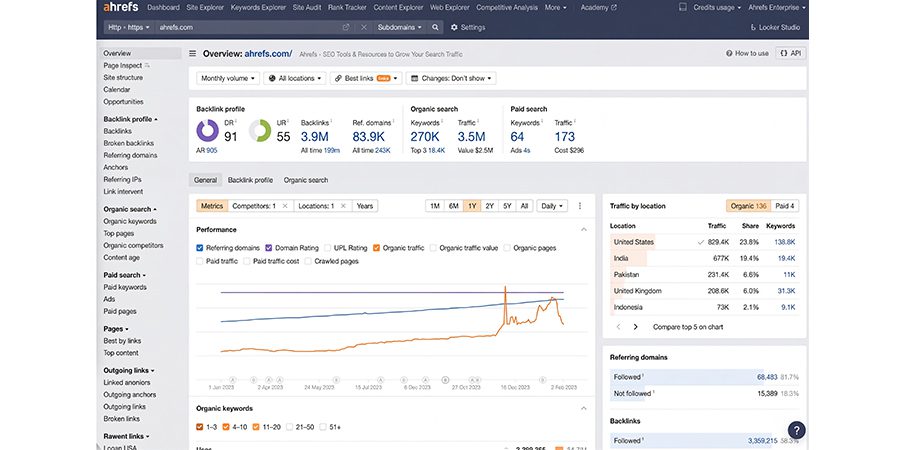
Before you proceed to reclaim your damaged links, you need to perform a thorough audit to check lost link opportunities and thus understand the quality of the backlink profile of your website. Doing this allows you to check linking pages, referring domains, target URLs, and also changes in backlink status over time.
You can do the same by leveraging tools like Semrush or Ahrefs to analyze the backlink profile of your website. Besides, you also need to check the number of link attributes, referring domains, the importance of linking websites, anchor text, etc.
You should make an effective comparison of historical backlink data with current reports to check links that have stopped or even disappeared pointing to any intended pages. Now, all you can do is determine the actual quality of the lost backlinks.
You should also take into account whether any referring website includes important topics, or links appear in the content naturally, or source page could lure relevant referral traffic. A damaged backlink from a reputed industry publication tends to deserve huge attention compared to one from a low-quality or even unrelated website.
- Find All Lost and Broken Backlinks
Now, it’s time to pay your complete attention to what went missing. In Ahrefs, you need to first open ‘Site Explorer’.
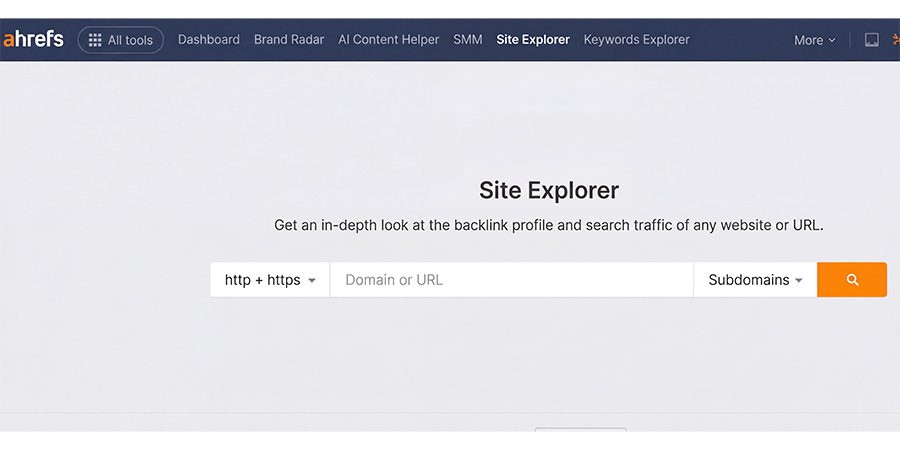
After this, you need to enter your domain and then go to the Backlinks.
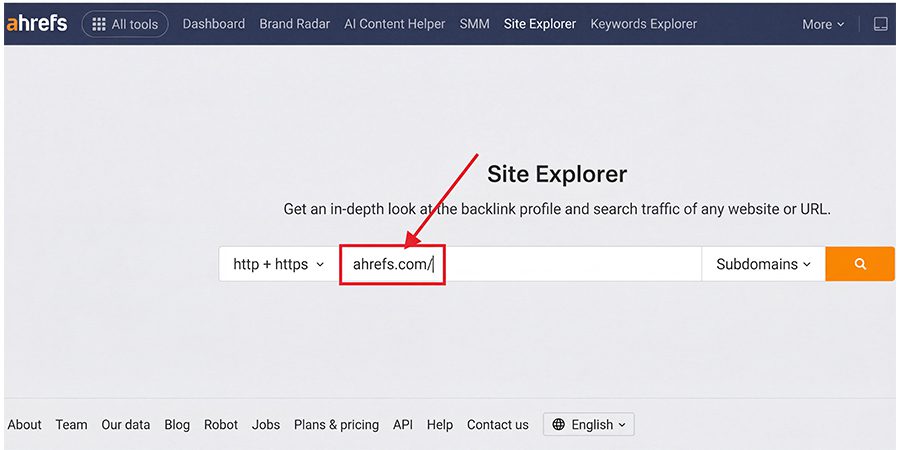
Once you do that, you can implement the “Lost” filter.
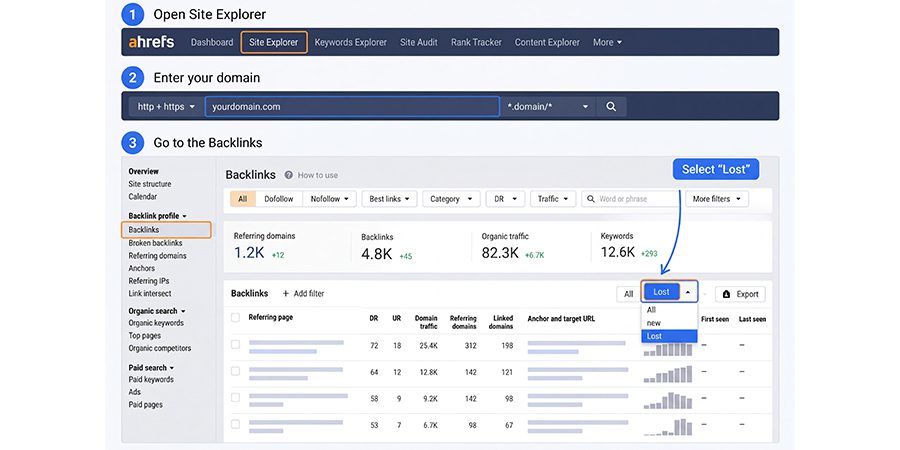
You can also leverage Semrush’s Backlink Analytics, which reflects lost links in the same way. Screaming Frog finds several damaged URLs on your website. The number is indeed quite surprising. In an Ahrefs example, its domain reflected approximately 6,285 lost links in almost 30 days.
After filtering only the top links, it dropped to approximately 594. However, the big number doesn’t mean loss of quality backlinks as the majority of lost links are basically junk that did not contribute much to rankings. Therefore, you should always filter for quality first and foremost.
It helps you understand why any link was damaged or lost. Ahrefs groups these reasons as follows:
- Page Not Found: The linking page was removed. It’s perfect to look if the page includes many backlinks.
- Link Removed: In this case, the writer takes your link off the page.
- Broken Redirect: It’s basically caused by changes on your website.
- Canonical or Noindex Changes: It’s basically not worth the time.
Google Search Console generally adds numerous clues. Its reports show 404 errors and also pages that have already lost visibility.
- Reclaim All Backlinks
Once you find out the lost backlinks for link reclamation, you need to take the right recovery action for each one. The entire solution is something that relies on whether the issue involves a website migration, a broken destination, a missing link on another website, or a removed page.
- Fix Broken Backlinks with Relevant Redirects
Backlinks often become ineffective when they point to a URL that no longer shows the intended content or returns 404 errors. If the original page has been eliminated, you can then implement a permanent redirect to the appropriate replacement page.
We can take an example here, when you change the URL of its comprehensive guide from:
Old URL: /blog/technical-content-audit/ to
The New URL: /resources/technical-content-audit/
In this case, other websites remained linked to the old URL – a permanent redirect guides both search engines and visitors to the updated resource. Google often recommends permanent server-side redirects, including HTTP 308 redirects or 301 redirects, when a URL is deleted forever.
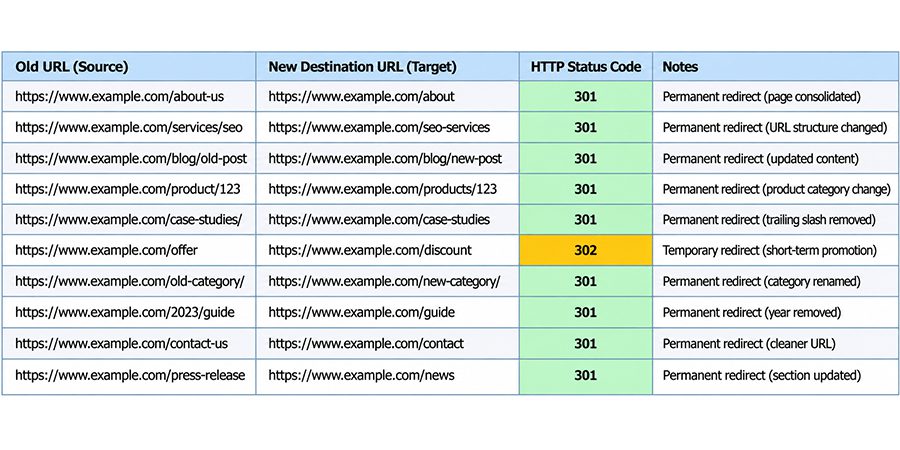
Meanwhile, the destination should match closely with the original purpose of the page. One thing you need to understand is that redirecting any broken URL to any homepage is certainly not the right substitute for any appropriate URL mapping.
- Recover Backlinks Lost During Website Migrations
Website migration is all about moving a website to a new domain, hosting platform, CMS, URL structure, etc. During the entire process, the existing URL of a website can change or may even become unavailable.
In case, old URLs of the web pages are not redirected properly to the new pages, external websites may even continue linking the old URLs. Due to this, visitors will face issues like 404 errors rather than the intended content.
You should always start by combining the old URL list with a completely new website structure.
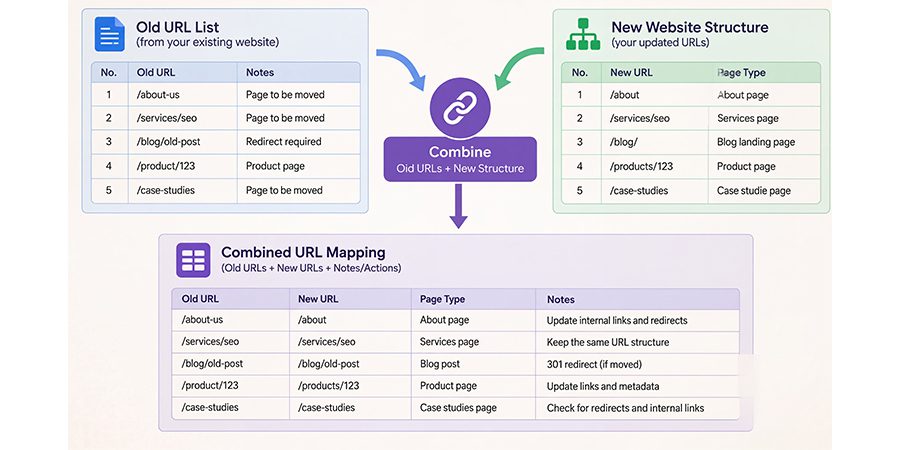
You should always check for pages that have important backlinks and also determine whether equivalent content exists at the new URLs. After this, you can craft a redirect map that can connect each old URL easily to its closest relevant replacement.
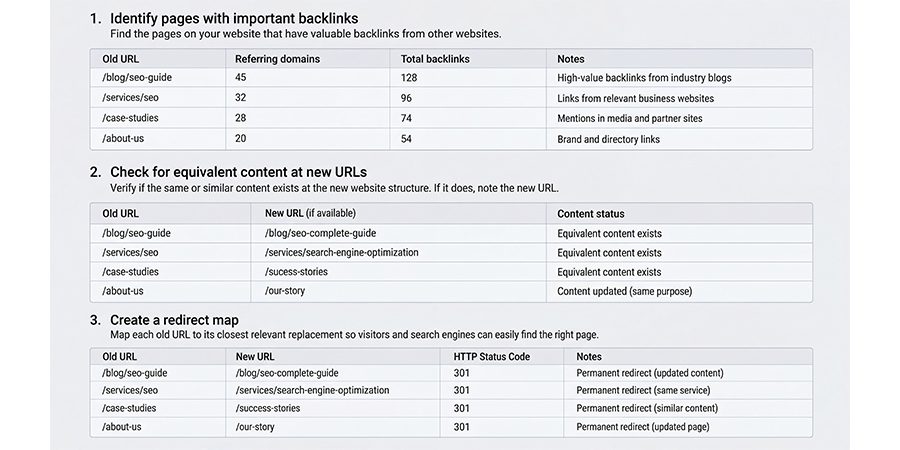
After implementing redirects properly, you should crawl the website to check for redirect loops, damaged destinations, unnecessary redirect chains, etc. You need to update XML sitemaps and internal links to reference the new URLs.
We can take an example here of an eCommerce website that moves its product guides to the new content management system. It can discover that some previously linked guides return 404 errors. So, restoration of these pages or also redirecting them to appropriate replacements can preserve access to those important resources.
- Repair Damaged Redirects
Several times, a backlink that points to a URL that redirects to another page, but a redirected path quite often no longer works. This can take place when a redirect rule gets changed, a URL is removed, or the final destination is not available.
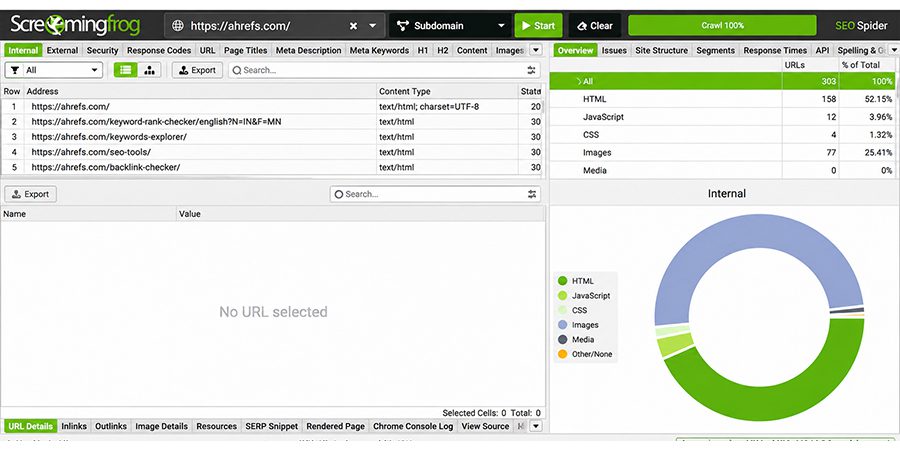
You can leverage crawlers, including Screaming Frog SEO Spider, to analyze redirect chains and then check URLs returning errors.
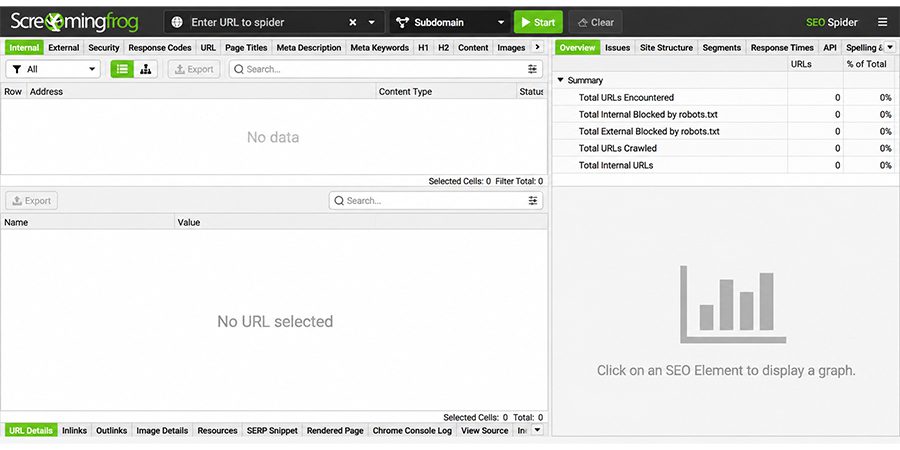
You should also check the path, right from the original URL to the major destination, instead of looking just for the first redirect.
For instance, a past URL gets redirected to any category page and then often gets redirected to the deleted resource. Correcting the redirects so the old URL points to the proper live article can enhance usability and thus simplify the overall path.
If possible, you should then use a single relevant redirect for link reclamation rather than using unnecessary hops. According to Google, you should always keep your redirect chains short and then direct the past URLs to their actual destination.
- Recover Backlinks From Deleted Pages
Before you proceed to recover backlinks from deleted pages, you should always verify if the source page is still available or not. You should also check whether the publisher has redirected the URL, moved the content, or temporarily experienced any technical issue. You can also utilize the Internet Archive’s Wayback Machine to check the past version of the page.
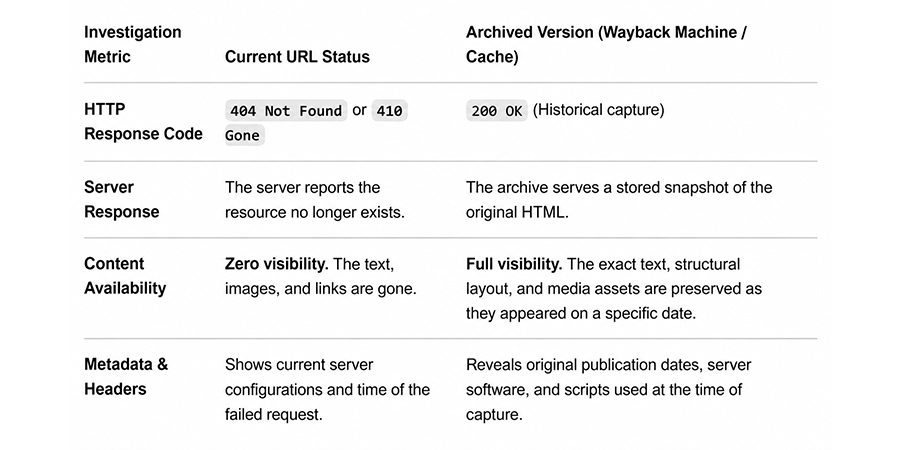
In case, the page is eliminated mistakenly, you should then approach the website owner and then describe the issue. When a publisher deletes the content intentionally, it’s important to find out whether a replacement page exists or not. You can indeed suggest a better resource only when it matches the original context genuinely.
For example, when an industry publication’s content related to web security is unavailable, but the publisher maintains a fully updated security resource, you could find out whether the original reference can be updated or restored.
- Convert Unlinked Brand Mentions into Backlinks
When it comes to unlinked brand mentions, they often take place when any website mentions a product, company, research study, or service, even without linking to any relevant website. Even though it’s not technically a recovery of a past existing backlink, it’s a related technique to reclaim various missed linking opportunities.
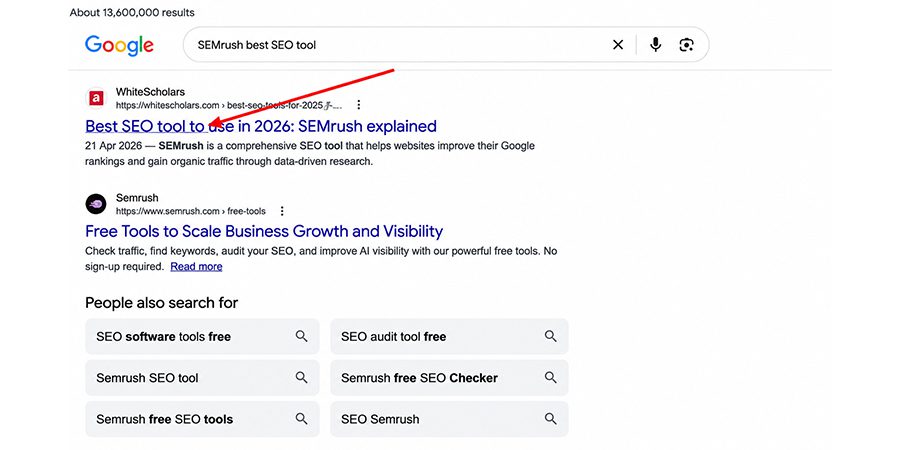
You can leverage Google Alerts, Google Search, and Ahrefs Content Explorer to find important brand mentions. It’s important to search for your brand name, distinguishing research titles, product names, etc. After this, you should analyze every outcome manually to discover if a clickable link remains available.
You should always focus on mentions where a link helps readers find any supporting information. For instance, if a technology publication references original cybersecurity research of any company but doesn’t link to the report directly, the company can then request a link to the research page.
- Recover Image-Based and Resource-Page Backlinks
Whether it’s infographics, images, resource pages, or original research, they also reveal link reclamation opportunities. There may be a possibility that your website can use your visual assets even without linking to your main resource, or they can even retain backlinks that often point to an outdated resource.
So, you can leverage reverse image search tools or Google Images to find those websites that feature your original images. You can visit those pages to analyze whether they credit your website and also whether the attribution includes a working link or not.
You should always analyze references to your research, guides, or tools when it comes to resource pages to find any missing links.
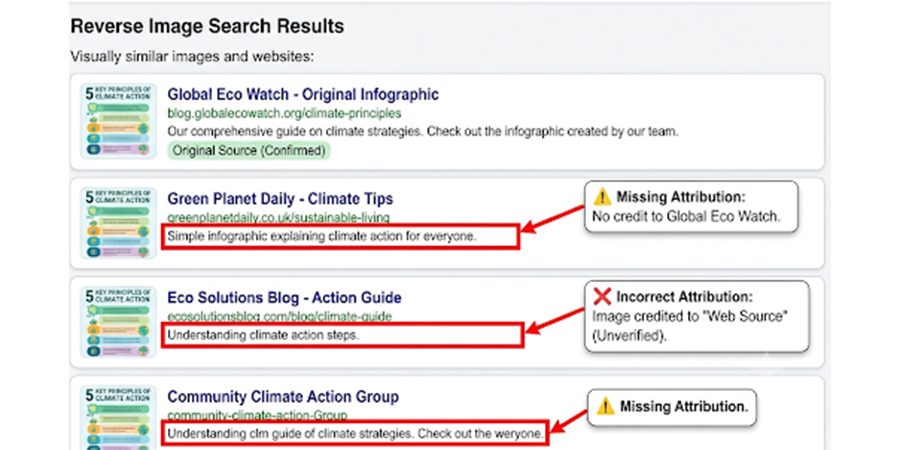
For instance, if any industry blog utilizes your original infographic related to your site performance but offers no source link, you can consult editors directly. And request the right attribution. In the same way, if the resource page links to any outdated URL for your research report, you can then suggest a better destination.
- Contact the Website Owner Through Personalized Emails
It’s another proven strategy for link reclamation. Technical fixes help you retain links on your own website. On the other hand, when another website eliminates your link, you require a human conversation as well. This is where a large number of people often commit the biggest mistake.
You should avoid sending a copy-and-paste email that begins with “Dear Admin Manager”. One thing you need to take into account is that no one enjoys just numbers. So, you should write your email to a real person, mention exact pages, and then make it convenient to say yes.
Your outreach email consists of the following important parts:
- A Warm Opening: It should be specific and mention those things you liked about their content.
- The Real Issue: Tell them clearly whether the link is broken or missing, and then share the URL.
- An Easy Fix: Provide the right link and an updated resource or fresh stats if it’s helpful.
- Close Politely: You should thank them and then make it clear even if “No” is an option.
For example, we can write the following email:
Hi Rohan
I loved the way you wrote and published an article in Small SEO Benefits. I also noticed that the link to our local SEO checklist no longer works. Let’s find an updated page (you can paste a link here). It can indeed be a handy replacement for readers.
Thanks for your valuable time!
Once you send an email to the recipient, you can follow up with them either once or even twice. You can definitely expect the desired outcomes when you send a warm and relevant message.
- Measure The Results
Link reclamation works only if you prove it works better. So, all you need to do is create a simple tracking sheet with various important columns. These mainly include action taken, loss reason, result, and data sent. After this, you can watch the following important numbers:
- Recovered Links: Number of links that came back and the source domains.
- Referral Traffic: Check Google Analytics to find visits from those sites.
- Rankings and Impressions: Check whether the affected pages improve in Search Console.
- Link Quality: Check whether you earn strong links, rather than the easy ones.
You should also wait for a couple of weeks to see the progress of link reclamation. Search engines often require time to recrawl pages and also pass value with the use of redirects. Besides, you should also analyze your outreach success rate.
Tools to Discover Lost Backlinks and Link Reclamation Opportunities
It’s not possible to fix anything that you can’t visualize. A large number of links often disappear without any notification or emails. That’s the reason why you need to leverage the right tools. Some of them are as follows:
- Ahrefs
As one of the top-rated tools for link reclamation, Ahrefs enables SEO professionals to check backlinks that are no longer visible in the backlink profile of a website. It includes a Site Explorer tool to offer a complete backlink report, including referring domains, lost backlinks, historical link data, etc. You need to analyze the target URL, referring page, and available link information to know why a backlink may be distorted.

Once you find the lost links, you should identify if the source page still exists and also if the destination URL works properly. This enables you to decide whether to approach the publisher, restore the original page, or resolve the broken URL.
- Semrush
Semrush comes with the Backlink Analytics tool. It lets you analyze referring domains, lost backlinks, and backlink attributes. It generates reports to check potentially important links that have disappeared and also analyzes any changes in your backlink profile.
You can compare the linked page, refer to the domain’s relevance, and also view available historical data even before deciding on a recovery action. This approach is helpful in focusing on important opportunities rather than spending time on every damaged link.
- Screaming Frog
Screaming Frog SEO Spider crawls your site to check damaged links, whether they’re external or internal, including URLs that return HTTP 404 errors. It also helps you analyze redirects and then find internal links that point to outdated destinations.
Though it doesn’t provide a complete database of damaged external backlinks independently, it’s quite useful for diagnosing technical issues on your website. It may prevent your existing backlinks from reaching your intent pages.
- Use Google Search and Reverse Image Search
With Google Search, you will be able to gather details of product references, brand mentions, company names, etc., that don’t include any backlinks. You should look for the brand name along with the relevant teams and also check whether the result links to your website manually.
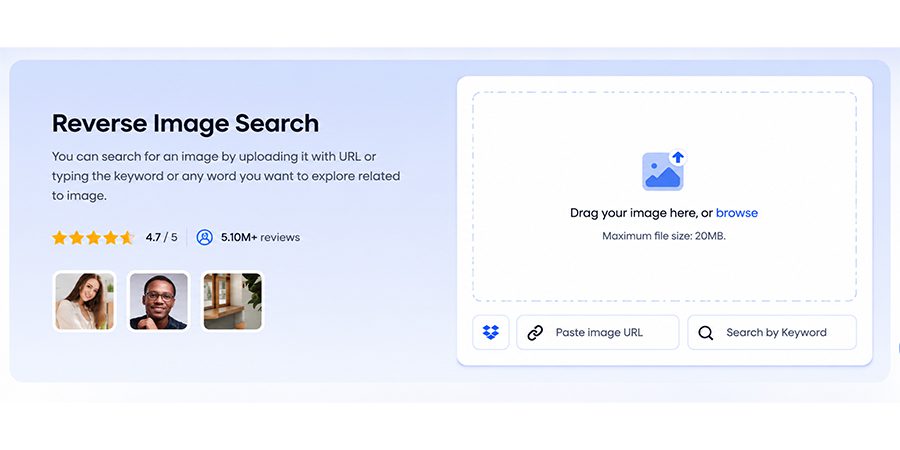
Google Images and reverse image search tools can help you identify those websites that use your original infographics and images without offering any appropriate attribution or link. You can contact the right publishers and request a proper link when it benefits readers.
- Analyze Google Analytics and Search Console
Google Analytics allows you to check referral traffic and thus identify the necessary changes in visits from external websites. On the other hand, Google Search Console offers essential information related to indexing, search performance, page availability, etc.
Though none of these tools provide a comprehensive lost-backlink report, they help in investigating the potential impact of website migrations or damaged destinations. You can combine these crucial insights with backlink tools to verify issues and focus on recovery efforts.
Some Common Reclamation Mistakes to Avoid
Though link reclamation seems to be simple, even small mistakes can waste your time and thus hurt your website ranking. We have discussed below some of these common mistakes and their appropriate solutions:
- Recovering Every Lost Backlink
We often try to recover every lost link and find the best possible way. But one thing you need to understand is that not every link deserves your actual effort. Some of them come from low-quality, spammy, or even irrelevant websites. So, recovering those links can be harmful rather than adding value to your website.
Solution: You can shortlist your lost links based on quality. After this, you should check the site’s relevance, authority, and traffic. You should then focus on a couple of links that truly matter.
- Avoiding Search Intent and Destination Relevance
For recovering any lost backlink, redirecting to the old URL of any available page is certainly not the perfect approach. It’s also vital to ensure that the replacement matches search intent properly, which visitors expect from the original link. For instance, when you redirect any product page to a homepage, it doesn’t cater to visitors looking for product details. This information causes a poor user experience as well.
Solution: You should ask “what visitors look for? You should then redirect to pages that offer the closest answer. In case you don’t find any great match, you should then craft a page that serves that need.
- Redirecting Every Damaged URL to the Homepage
This is a common shortcut that attracts most of us. It indeed feels quite easy, but it also focuses those visitors and quite often gets treated like a soft 404 by search engines. The link’s value mainly gets lost.
Solution: You can use one-to-one redirects and then send every old URL to its relevant new page. Besides, you can also use a 301 redirect and then maintain the short path to avoid any kind of long redirect chains.
- Considering Every Unlinked Mention as a Guaranteed Backlink
When you discover a brand mention, it appears as if you already won the race. But writers may not reply to you, or they may even refuse to add links to your website. So, when you rely exclusively on it, it causes huge disappointment and inaccuracy in reporting as well.
Solution: You need to consider each mention as a chance rather than a promise. It’s advisable to send a friendly, short, and personal message. You can make it convenient for them by just sharing the exact page along with the suggested anchor.
- Approaching Publishers Repeatedly Without Adding Any Value
When you approach a publisher with a common message like “request to add my link”, you will definitely not get a reply. They are often busy and will not entertain messages like yours, as they often get thousands of such messages. Sending this message also impacts trust adversely and thus closes the door on your future chances.
Solution: You can follow up with them once or even twice by maintaining space between messages. It’s important to provide something useful every time, including a fresh quote, updated data, corrected facts, helpful resources, etc.
FAQs
Ans: Well, link reclamation should be done at least monthly. If you have a large website, you can perform audits quarterly to complement your monthly checks and thus help in recovering important linking opportunities before they get lost.
Ans: No, a redirected link doesn’t pass link equity. A 301 redirect can pass link equity to the destination URL, but Google still doesn’t guarantee it for every single transfer.
Ans: No, not every 404 page with backlinks requires fixing. You should prioritize pages that have relevant and top-quality backlinks. They should have valuable content and referral traffic. You can either redirect or restore the page to the closest relevant destination.
Ans: Yes, link reclamation is a better choice than creating new links since it brings the possibility of recovering damaged backlinks or even earning links from your existing brand mentions. So, you can blend these strategies to support sustainable and strong backlink growth and also SEO performance.
Ans: Well, recovering a lost backlink often takes a couple of days to several weeks. It depends on the response of the website owners and also the actual reason for the loss.
Conclusion
Link reclamation is of great importance for businesses to recover important backlinks, resolve broken links, and also make proper use of their existing SEO efforts. Once you identify the damaged links, you can leverage the best tools, focus on relevant opportunities, and then consult publishers professionally.
Meanwhile, doing all these successfully requires ongoing monitoring driven by a robust strategy. Partnering with a professional SEO company helps you do it effortlessly and thus make your reclamation of lost links successful.

