





Imagine a scenario where you publish two pages for the exact same keyword to understand whether Google ranks the wrong URL or just switches between them. This is a case of keyword cannibalization, which creates an SEO dilemma when pages actually overlap in search intent and topic.
Cannibalization has become a common issue for websites and everywhere. It can occur when many pages of the same website target a specific search intent, which makes it really tough for search engines to decide which page should be ranked.
Ahrefs reveals that out of 9,700 cases of different pages ranking for a single keyword on its website. In this post, we will discuss some of the best practices to deal with cannibalization and thus prevent your ranking conflicts.
What is Keyword Cannibalization?
Keyword cannibalization is basically a scenario that occurs when two or more pages target the same keyword. It is confusing for Google to decide which is the right page to show. In this case, your pages compete against each other rather than competitors.
Cannibalization is a mistake that takes place inadvertently. Suppose you create a new blog post even before checking what your website already has. So, it overlaps with your older posts. After some time, it splits traffic, damages backlinks, and affects rankings on both pages.
Let’s explore some of the common signs of cannibalization:
- Decline in organic traffic, even though posting more content.
- Two pages rank for a single keyword.
- Lower click-through rates since pages compete for the same click.
- Confused internal linking with different pages linked with the use of the same kind of anchor text.
Why Keyword Cannibalization is Always Bad
Some marketers assume having multiple pages for one keyword just means more chances to rank. In reality, it works against you. Search engines don’t reward quantity here — they reward clarity.
When your own pages compete, you’re not doubling your odds. You’re splitting your authority, traffic, and ranking potential across pages that should have been working together. This is why cannibalization is never a neutral issue, let alone a helpful one. It quietly drains the results your content should be delivering.
Here’s why keyword cannibalization always hurts your SEO:
- Diluted ranking signals: Backlinks and engagement get split instead of consolidated on one strong page
- Lower rankings overall: Google may rank both pages lower than a single, well-optimized page would rank
- Wasted content effort: Time spent writing near-duplicate content could’ve gone toward new topics
- Inconsistent messaging: Users land on different pages with slightly different information
- Poor crawl efficiency: Search bots waste crawl budget on redundant pages
What Are Real Causes of Keyword Cannibalization?
Cannibalization is the most common problem when the site grows, and more individuals contribute content even without tracking what’s already been published. We have discussed some other root causes of cannibalization as follows:
- Location Pages with Identical Content
Businesses that operate from multiple locations often create a page for every service area or city. They then use the template with different city names.
For instance, if two pages like “Plumber in Virginia” and “Plumber in Austin” are the same word-for-word, apart from location tags, search engines often struggle to treat them as distinct pages. Both pages struggle to rank for the same term rather than capturing local search traffic.
- Multiple Service Pages Targeting Identical Intent
This issue occurs when you create separate pages for each service that are basically the same rather than worded differently, including “Website Design Services”, “Web Design”, “SEO Strategy Services”, or “SEO consulting”.
Both pages are created for the same searcher with the same search intent. So, the site ends up splitting it across two competing pages rather than creating topical authority.
- Improper Keyword Planning
Writers often choose keywords that just sound important and quite relevant even without checking intent, search volume, or what’s published on their website. Two different people tend to end up selecting the same core keyword for two important separate articles, just because no one checked first.
- Lack of Keyword Mapping
When you avoid determining your content strategy, it causes your team to target keywords that are quite similar or include overlapping search intent. If you only chase keywords that look good because they have a higher search volume and a lower difficulty rating, you have a higher possibility of facing keyword cannibalization.
- Internal Linking mistakes
If you use the same anchor text for different pages when linked internally, you weaken the importance of one of these pages to create a powerful authority across that keyword. It’s a great idea to use the focused (primary) keyword or their close variations as anchor text for only one page. This is necessary to ensure consistency throughout your overall internal linking strategy.
Impact of Keyword Cannibalization on SEO
The impact of keyword cannibalization is not just limited to minor ranking loss – it impacts adversely on the organic growth of your website. Let’s find out some other impacts:
- Minimized Click-through Rates
When you find two pages of your website appear for the same kind of search query, users often get confused about your brand. Some users click one page, whereas others click the other.
So, this click ends up split between two different listings rather than building up one powerful result. Always remember, an individual page that is perfectly optimized with the finest title and description performs better than pages that compete against each other.
- Poor User Experience
If a user looks for “top running shoes”, they may always expect to find an individual page that provides an unbiased overview of the best available options. Meanwhile, it tends to be unclear whether they encounter both a product page and a category page in search results. They may click on a page to get general information but may land on the product page, which leads to a poor user experience.
- Lower Organic Rankings
It’s another major repercussion of cannibalization. It’s a search engine algorithm that decides which of your pages match a given query better. When it’s not able to determine the right page to rank, it promotes both pages for ranking rather than ranking a single, highly consolidated page. It causes both pages to compete against each other even without a clear winner among them.
- Reduced Topical Authority
If two of your pages target one common keyword, it impacts adversely on the both relevance and authority of your website. In this case, rather than creating the authority on the one page that offers complete information regarding products or services, it often gets divided between the product and category page. As a result, it negatively impacts the authority of every page.
How to Check Keyword Cannibalization
Well, finding cannibalization is a process that involves not just detecting one bad page but also looking at overlap across your content. We have described below how to check this issues on your website:
- Manual Method
With a manual method, you can quickly find out whether many pages of your website compete for the same search term or not. A few important ways are as follows:
- Use the Site Operator to Surface Related Pages
You can do a Google search for the site: yourdomain.com “your keyword” to check those pages of your website that mention the same keyword.
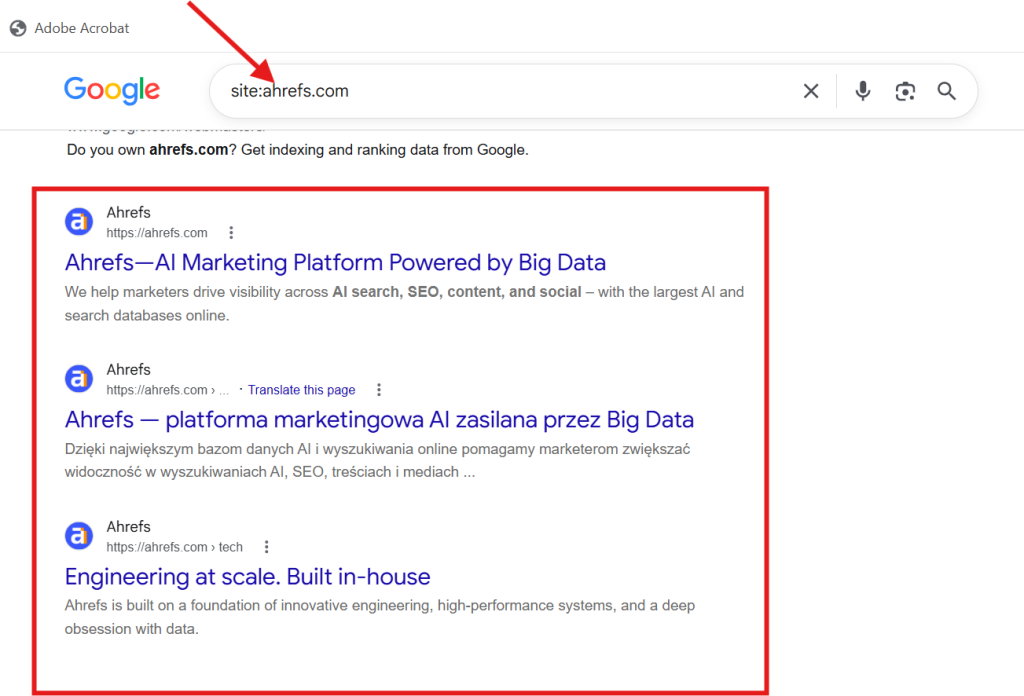
Here, we took the example of Ahrefs.
It gives you information regarding how Google indexes those pages and then finds the same keyword on them. In most of the cases, only a single or two of these important pages are mainly competitive for the query. The rest may not really matter or may be loosely related.
Still, it’s highly important since it allows you to spot pages fast with the same angles, titles, and topics that may be stepping on each other.
- Check Google Search Console
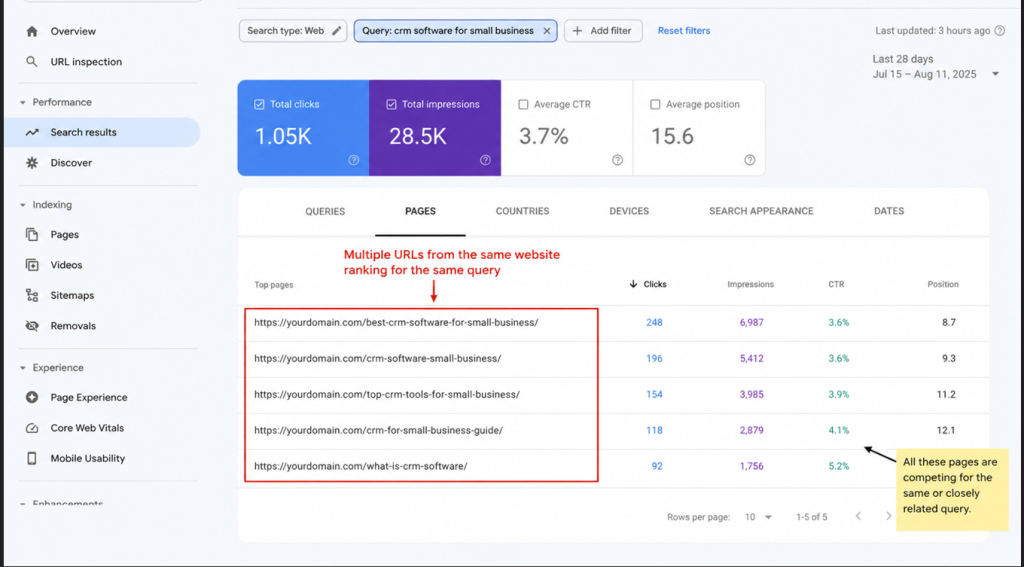
The fact can’t be denied that Google Search Console is the most trusted method to confirm whether various pages appear for the same and common keyword.
To do the same, you just need to follow the steps below:
Performance >Search Results and add a Query filter. After this, you need to enter the required keyword you wish to analyze. Here, you can review a complete list of pages that have already appeared in search for the term or also have a close variation of the same.
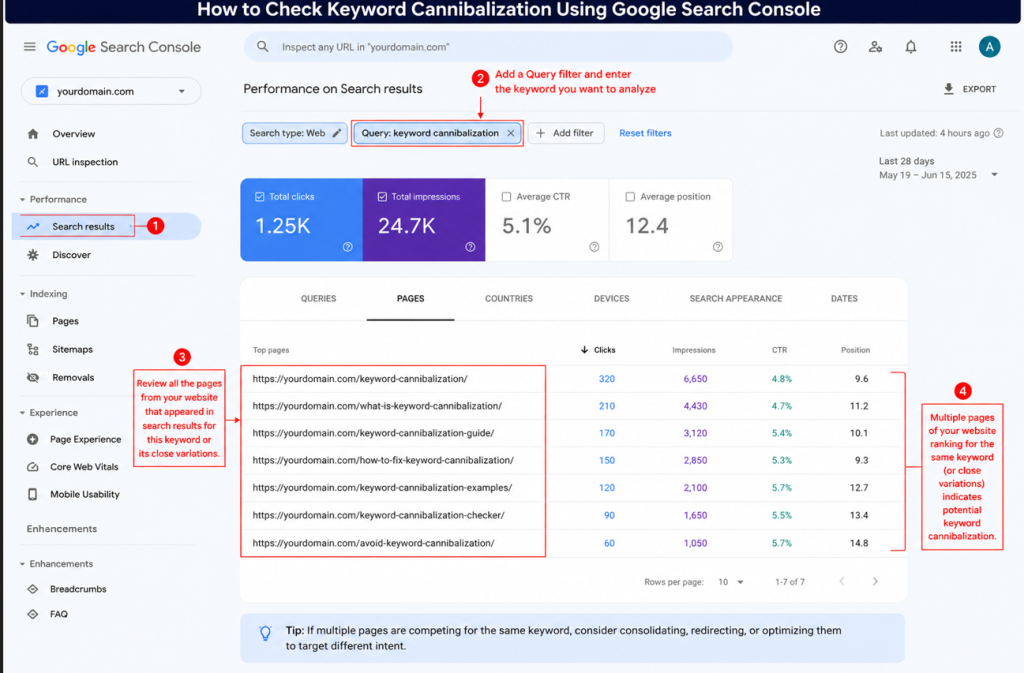
You can then click the “Pages tab to check the URLs that earned impressions and clicks for the same keyword. You need to switch to Queries if you really wish to see the same or related search variations.
If you find two or even more than two pages have the same impressions for that keyword, you may now need to decide which page you should prioritize. You also need to decide whether the other pages should be merged, updated, retargeted, or redirected.
- Automated Method
You get an option to automate cannibalization checks with the use of many tools — some of them are paid, and others are free. For paid options, you will come across many popular tools such as Screaming Frog, SEMrush, TrueRanker, Ahrefs, and others.
But if you don’t have enough budget or simply are not interested in opting for a paid tool, you can go with a free option like Website Ranking Checker. This tool is indeed free and thus automates the entire process of checking keyword cannibalization. It highlights those keywords that are targeted by many pages of your website.
The next free tool is Google Search Console. Its data groups the cannibalized keywords and shows how many pages are related to each of them. It also highlights clicks and impressions. With this tool, you will have a detailed overview of where overlap occurs and also the overall affected visibility.
From there, you can use View Pages, which enables you to drill into the keyword and also check exactly which URLs compete for the same. You get an option to analyze those pages that are involved in cannibalization and find out whether they compete with each other or not. It allows you to discover the primary overlap issues even without digging through everything manually.
The extra actions make it indeed convenient to organize the report better as you work. ‘Add Task’ works best for those issues you wish to handle later. It allows you to move the issue to a completely separate workspace where you will be able to manage your optimization tasks easily and also work through fixes in an organized way.
How to Fix Keyword Cannibalization
Once you find a cannibalization issue, you need to make a strong strategy to fix it. You can either remove one of the pages or merge the overlapping content that competes for the same keyword. The following are some other ways that help you deal with these issues better:
- Page Consolidation
You can combine those pages that target similar keywords into a single, and the most powerful page. All you need to do is remove overlap, take the top section from each of them, fill any gaps, and then turn them into a more complete and single resource. Once you select the main page to keep, you need to ensure weaker URLs are redirected properly.
- Use 301 Redirect
301 redirects are an important part of resolving keyword cannibalization. It works effectively when overlapping content needs to be eliminated. After this, you can combine the important and useful parts of the weaker page into the same page and then redirect your old URLs to your updated page.
It helps search engines understand which page should rank. From a technical point of view, this means setting up a 301 (permanent) redirect in your SEO plugin, CMS, server settings, etc. Here, your main task is to point your old or existing URL directly to the new primary page.

Meanwhile, it’s necessary for you to verify the redirect after the final setup. You can, in fact, use many ‘Redirect Checker Tools’ to confirm whether search engines and users reach the intended destination without unnecessary redirect loops or hops.
- Differentiate Keyword Intent
In many cases, you don’t need to merge two pages to fix keyword cannibalization issues. The reason is that some pages are poorly targeted. For instance, if your website has pages like “Running shoes for Men” and “Best Running Shoes for Beginners”, they are definitely meant to cater to different audiences.

All you need to do is check the search intent closely behind every keyword. You need to find out whether both pages are transactional or informational. Once you have clear information regarding each page, you can then rewrite the content, headers, and titles to reflect that actual difference with clarity.
- Update the Structure of Internal Linking
Inconsistent internal linking can make your resolving keyword cannibalization effort futile, even after clarifying intent and consolidating pages. So, you need to audit your website for internal links that use the same anchor text pointing to different and multiple URLs. You can update them properly so they all point towards your main targeted page.
It helps search engines understand exactly the page you wish to rank for a specific keyword. It also increases page authority through concentrating internal link equity in one place instead of spreading it thin across pages that are meant to be different from each other.
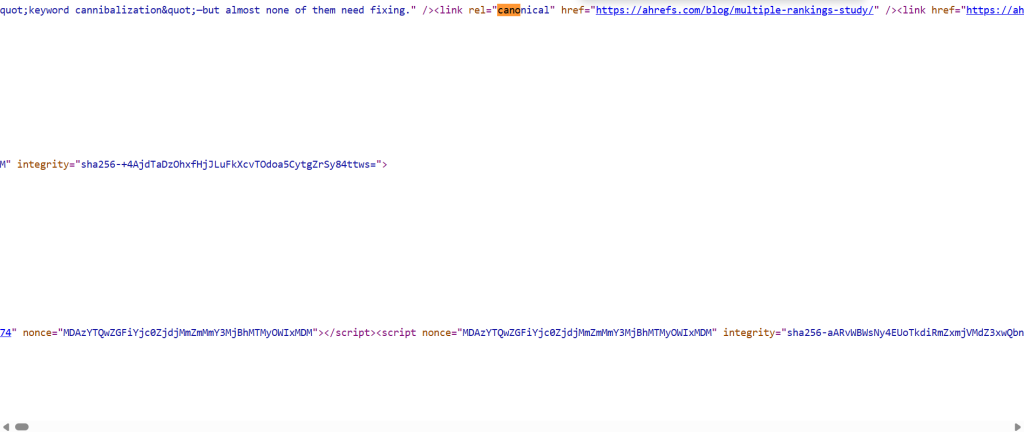
- Use Canonical Tags
When it comes to canonical tags, they help search engines understand in terms of how to handle duplicate pages. If you discover some pages look similar, a canonical tag helps search engines know which one should be the main option. This works better in many situations where pages need to stay separate in the following ways:
- Regional or language versions
- Filtered product listings
- Same landing pages used for multiple campaigns
You can do the same with the help of your CMS or an important SEO tool in just a few clicks. It’s vital to ensure that canonical points to the page you want search engines to recognize as a primary version.
- Deindex Low-quality Content
Before we talk about how no-indexing helps in resolving keyword cannibalization issues, it’s important to understand what it is. No-indexing means sending instructions to search engines not to include it in search results. Of course, this page will stay live on your website, but it will not appear in SERPs.
This is something that works best when a page still allows users but is certainly not doing much for search. For instance, if you have niche content that is apt for a pillar page — it can still be useful.
It’s a good idea to keep it for readers. But if you find it brings less organic SEO traffic and overlaps with the keywords that your main website page ranks for, keeping both indexed pages raises more competition than you need. In this case, you can no-index the weaker page, which allows you to focus on the page that is of great importance.
Common Mistakes to Avoid
No matter how experienced your team is, they can commit certain mistakes while fixing keyword cannibalization. So, it’s important to know what not to do, apart from a crucial strategy:
- Avoiding Search Intent
One of the major mistakes most SEO marketers commit is that they often target a keyword based on search volume rather than search intent. If the keyword’s top results are product pages but you publish blog posts, you will just miss the mark. It causes unintentional overlap with a completely different page on your website.
Solution: You need to always search for the keyword yourself before you craft any pages. Make sure you study the top 10 search results.
- Excessive Use of Canonical Tags
Most websites leverage canonical tags on every overlapping page rather than addressing any root cause. And they think search engines can sort it out automatically. But they should also think that canonicals are just suggestions, and there’s a higher possibility that Google can ignore them if pages are indeed not similar enough.
Solution: You can leverage canonicals only for those of near-duplicate pages, including filtered product URLs. It’s a great option to differentiate or merge pages.
- Publishing Duplicate Blogs
Many content teams often work without a foolproof plan. They often republish those on similar topics under different types, while thinking it’s fresh content. But in actuality, this only creates different competing pages.
Solution: It’s a good idea to maintain a content calendar with complete keyword details. You should perform a detailed search to ensure that the topic has not been published earlier.
- Deleting Pages with Backlinks
While resolving cannibalized pages, SEO marketers often delete the weaker ones. If this page has already earned backlinks over time, those links often point to a 404, and thus link equity disappears.
Solution: You need to redirect your weaker web page to the stronger one with the use of a 301 redirect. It preserves backlink value and then passes the same onto the page you actually wish to rank.
- Targeting the Same Keyword Repeatedly
When you decide to target even the same keyword across different pages and think one of these will rank, it will make your effort futile. It will finally deprive you of getting results.
Solution: You should assign every keyword to exactly one URL. You need to use supporting subtopics and variations rather than repeating any primary keyword.
Real Examples of Keyword Cannibalization
While talking about real-world examples of keyword cannibalization, it’s crucial to talk about Ahrefs, which already documented a real cannibalization issue. Its own pages target the same keywords such as “SEO case study” and “SEO case studies”.
Most of its pages were competing with related queries, and the ranking kept switching between multiple URLs. When Ahrefs posted a new case study, an older one could drop from the search engine results pages (SERPs) and also be replaced by the latest page.
- How Ahrefs Resolved Keyword Cannibalization
Ahrefs resolved the cannibalization issue by creating a pillar page for its SEO case studies. They also linked the individual case studies from the same page. After the final consolidation, the pillar page finally secured its position among the top 10 and immediately remained in the top three most of the time.
FAQs
Ans. Yes, cannibalization affects local SEO rankings. It impacts adversely on rank, visibility, importance, and organic traffic of your website for any local search queries.
Ans. Yes, cannibalization directly impacts featured snippets. It leads to inconsistent snippet visibility and thus prevents relevant pages from gaining position in snippets.
Ans. You need to audit your website at least quarterly to check for cannibalization issues. You can do additional checks, especially after website redesigns, content updates, significant ranking changes, etc.
Ans. Keyword cannibalization takes place when different pages compete for a single search term. On the other hand, duplicate content mainly refers to the same content that appears across different pages, irrespective of the keywords they target.
Ans. Yes, Cannibalization impacts AI Overviews extensively by causing confusion related to those pages that answer a query. It weakens topical signals, which makes it complex for search engines to opt for your favorite page as a source.
Ans. No, it’s not necessary. You need to first find out whether duplicate pages cater to different search intents. It’s a good idea to redirect redundant pages and retain only important pages that target distinct audiences, intent, or keywords.
Conclusion
Keyword cannibalization is not just about many pages ranking for just one keyword. The actual concern is when overlapping pages target the same kind of search intent and compete for traffic, visibility, and authority. Meanwhile, you can fix the ranking conflict by aligning content with search intent, using effective keyword mapping, reviewing existing pages, and clear internal linking before publishing new pages.
You need to audit your content regularly to discover genuine cannibalization while ensuring every page has a clear purpose in your entire search engine optimization strategy. Partnering with a reliable SEO company helps you resolve cannibalization issues better.

