






Businesses today publish more content in hopes of improving their search visibility. But it doesn’t help them in any way. As a result, their content libraries grow and create overlapping articles without a unified keyword-to-URL strategy. This creates more difficulty in content maintenance and makes it unclear which pages answer searchers’ queries. Content consolidation works as the right solution for this.
It helps businesses discover the perfect opportunities to improve their existing content instead of just publishing more pages. They should gather information regarding page performance, search intent, relevance, content quality, etc., before deciding to combine, update, and retain pages.
In this post, we will discuss content consolidation and required strategies.
What is Content Consolidation?
Content consolidation is a strategic SEO process that involves discovering overlapping content and determining pages that deserve to remain and improving relevant resources to match search intent. It includes reviewing these pages and updating them with necessary elements.
With time, a large number of websites often end up with many articles on similar topics. And this is something that often creates confusion for search engines and thus impacts ranking heavily.
So, rather than leaving those pages to overlap with each other, one creates a single page by taking the best parts of these pages. After this, the old pages are then redirected to the new one with the use of 301 redirects.
What are the Types of Content Overlap?
There are different types of content overlap — knowing each one of them helps you discover issues early and take proper action to resolve them immediately. The following are some of the important types of content overlap:
- Search-Intent Overlap
Search-intent overlap takes place when numbers of pages target the same underlying intent behind a search query. We can understand it easily with an example like — any website that publishes two posts like “Tips on Starting a New Blog” and “Important Steps to Launch a New Blog”.
Both of these posts are meant to target beginners seeking to start blogging. Though they have different titles, they actually serve the same objective. They become competitors of each other in search results, rather than working together .
- Topic Overlap
Topic overlap takes place when multiple blogs or articles on a website cover the same topics and concepts, though their primary keywords are different. For example, when you publish a post on your website titled “Importance of Technical SEO” and “Benefits of Technical SEO”.
Both topics cover the same concept with repeated examples, explanations, recommendations, etc. So, you need to analyze their unique contributions. It helps you find out whether combining both of these posts improves topical coverage or differentiation would serve readers properly.
- Duplicate Content
Duplicate content refers to the same text or even so-called text that appears on multiple URLs. This can be either on your own website or across multiple sites. The most common causes of duplicate content include copied product descriptions, URL changes (http and https), printer-friendly page versions, etc. Search engines often have difficulty selecting the right version to display, which hurts visibility of your brand.
Proven Strategies for Content Consolidation to Minimize Overlap
Content consolidation requires robust strategies and better implementation to work effectively. We have discussed some of these strategies as follows:
- Audit the Existing Content of Your Website
Before you start your practice of content merging, you need to audit your website thoroughly to understand the actual issues. To do it better, you need to export URLs of your website using tools like Screaming Frog SEO Spider.
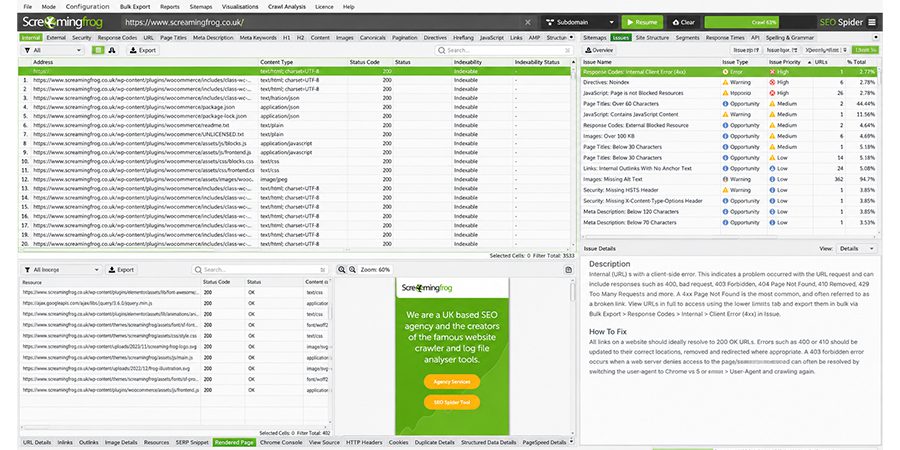
You can combine the data with Google Analytics and Google Search Console. It helps you know the performance of every page in organic search and thus their contribution to your business objectives.
So, you may be thinking about what types of information should be collected for content consolidation, right? Well, we have discussed the following details you should focus on:
- Page Title and URL: You should check page titles to ensure they describe the topic and include a primary keyword. Make sure the URL is clear, relevant, and of an appropriate length.
- Organic Clicks, Impressions, CTR and Average Ranking Position: Know how often users see and access each page from Google Search. Find those pages with higher visibility but have limited clicks.
- Backlinks and Referring Domains: Check URLs with external links that are meant to be preserved.
- Organic Sessions and Conversions: Analyze whether any page lures relevant visitors and boosts sales.
- Quality and Content Freshness: Check thoroughly for missing sections, outdated information, weak examples, repetitive explanations, etc.
With the use of Google Search Console, you will be able to explore information regarding click-through rate, impressions, clicks, and average positions. On the other hand, Google Analytics helps you determine on-site engagement and conversions.
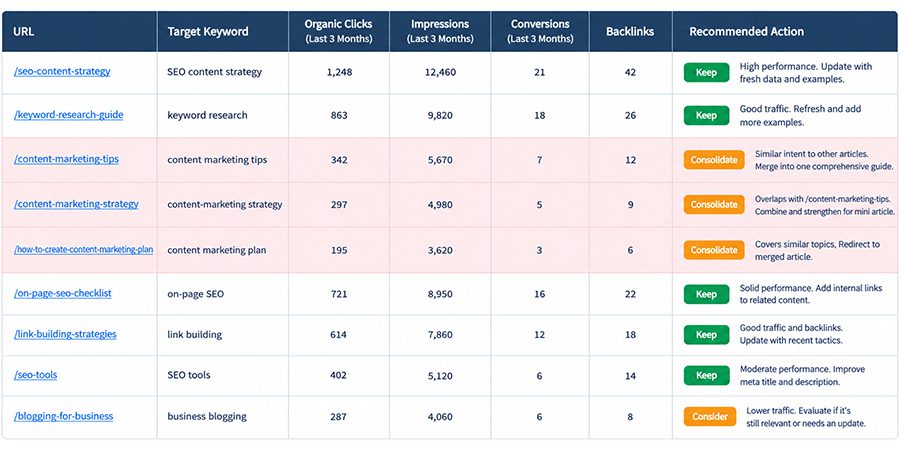
For instance, if you post 10 articles related to content marketing, 2 out of them target similar topics, 4 attract less traffic, and two include outdated product recommendations. In this case, auditing helps your team understand pages that overlap and serve distinct needs.
- Find Content Consolidation Opportunities
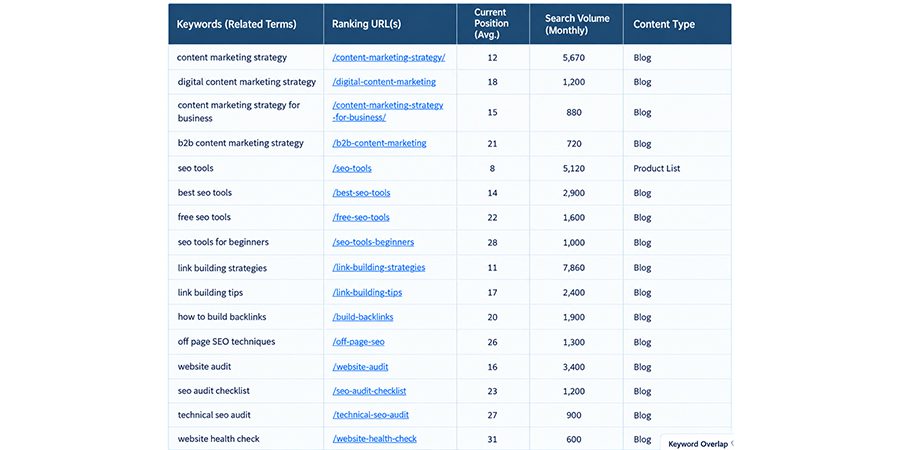
After completing the entire audit process, you can group pages based on keyword, topic, search intent, etc. It helps in finding pages where content consolidation is required. Your main objective should not be to check every article that covers the same keyword.
Rather than this, you should find out whether different pages compete to cater to the same user requirement or offer similar information without providing any meaningful differences.
All you need to do is go through the following important patterns:
- Topic Overlap: It means articles that explain the same process or even concepts repeatedly.
- Keyword Overlap: It means a large number of URLs target the same primary or even closely related keyword variations.
- Search Intent Overlap: In this, different pages answer the same queries for the same targeted audience.
- Content Duplication: It’s reflected when two or more URLs include similar materials.
- Fragmented Topical Coverage: In this scenario, many short articles focus on particular aspects of a specific subject but often fail to offer a complete resource.
You can leverage many tools such as Screaming Frog, Semrush, Ahrefs, Google Search Console, and others to find these patterns and thus discover content consolidation opportunities. You can also use keyword-to-URL mapping spreadsheets, which are quite useful for visualizing those pages that target the same keywords.
- Merge Similar Articles into a Single Resource
When you notice a large number of articles cater to the same search intent, you need to merge them into a single authoritative resource. It minimizes unwanted duplication while improving the usefulness of the overall content.
You can begin the entire process by selecting the powerful destination URL. It’s advisable to analyze the organic traffic of every article, backlink profile, ranking history, topical relevance, conversions, existing content quality, etc.
If you find a page that generates the highest traffic, it should not automatically be your first choice. Instead, you should consider the destination that should be an appropriate foundation for the content consolidation resource.
The next important thing you can do is to analyze useful information in every piece of your content. You should also focus on preserving practical examples, unique insights, expert commentary, relevant statistics, sections, etc., which answer important user queries.
The next important thing you can do is to remove those claims that are outdated and repeated explanations. We can understand it through an example — suppose you have published the following articles on your website:
- What is Content Marketing?
- What are Benefits of Content Marketing for a Business?
- How to Create the Most Effective Content Marketing Strategy?
These seem to overlap with each other, so you can create a comprehensive guide that should cover the definition of “Content Marketing” along with the planning process, business benefits, measurement, implementation, and more.
Once you create a consolidated article, your next task is to update its title, headings, introductions, examples, internal links, etc. These ensure your article includes a logical content structure.
According to recent stats, a successful content consolidation improves both clarity and completeness rather than just increasing the word count. An article that is written with over 500 words and also answers target queries often outperforms content written in 3,000 words and is repetitive in some manner.
- Improve an Existing High-Value Page
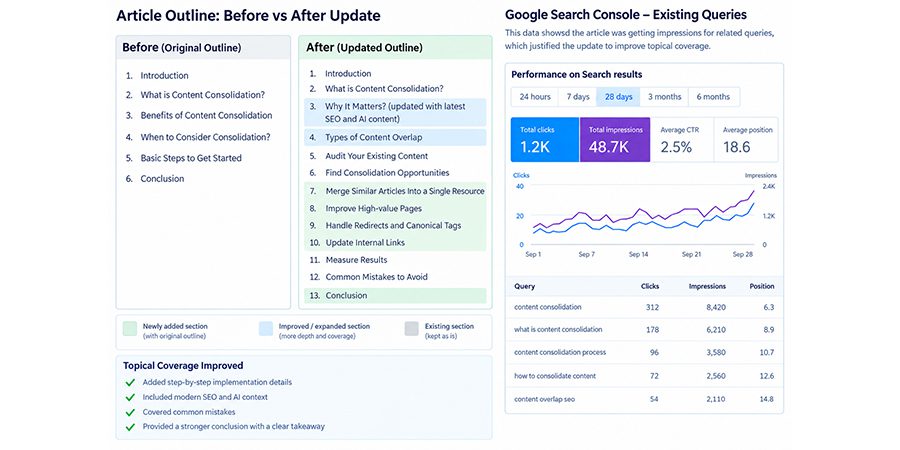
HubSpot revealed that updating an older post yields 106% of monthly organic views on it. You need to take into account that every consolidation opportunity requires managing a number of URLs. Besides, the right approach is to improve an existing page by incorporating important information from those articles that are incomplete or even weak.
This is a vital strategy that works especially well when a page already gains huge organic traffic, generates backlinks, ranks for relevant keywords, etc. but also lacks enough depth to cater to the vast search intent.
You should start by observing the existing rankings of the page and also the search queries in Google Search Console. Besides, you also need to find out the related queries that the page answers partially, crucial subtopics it misses, and also sections that require updating.
You should then analyze various overlapping articles to check information that is meant to make a primary resource quite useful. All you need to do is incorporate comparisons, relevant examples, updated facts, original insights, practical instructions, etc., where it matches naturally.
For example, a software development company may have a complete guide on “Web App Development Company”. You need to separate those articles related to pricing factors, development timelines, maintenance expenses, etc. These could offer important material to improve that guide.
You should always record the existing performance of a page before you make even a single change. And then you can present your important elements that already work. Once updated properly, you need to ensure the title, headings, and content reflect the intended topic of a page.
- Compare Search Intent and SERP Results to Reposition Pages
Similar keywords are not always an indication that content consolidation is required for two pages. Search intent often determines whether users seek the same kind of information, and Google’s search results can help reveal the differences.
Before you merge any articles, you need to always look for their primary keywords and then make an effective comparison of results. Besides, you should also observe ranking pages, dominant topics, content formats, appearance, and requirements.
You can go through the following important examples:
| Search Query | Likely Search Intent |
| What is Keyword Research? | Informational |
| Best Keyword Research Tools | Commercial Investigation |
| Ahrefs Keyword Research | Product-Specific |
These are important queries that mainly belong to the vast topic. But they don’t necessarily require the same kind of page. You need to combine them into a single resource by ensuring content requirements and search intent align better.
When analyzing properly, you should always compare some top-ranking outcomes for every important query and also take note of whether the SERPs reflect similar formats, URLs, content angles, etc.
If you find some keywords return overlapping results, this supports a content consolidation decision. In case they return distinct outcomes, you should always consider retaining some separate pages and also repositioning their complete focus.
Besides, you can also leverage Google Search Console to determine queries that generate both clicks and impressions for every URL. This indeed helps in identifying whether articles attract traffic for any unintended topic or overlap with another page as well.
- Redirect Retired Pages to Relevant Destination
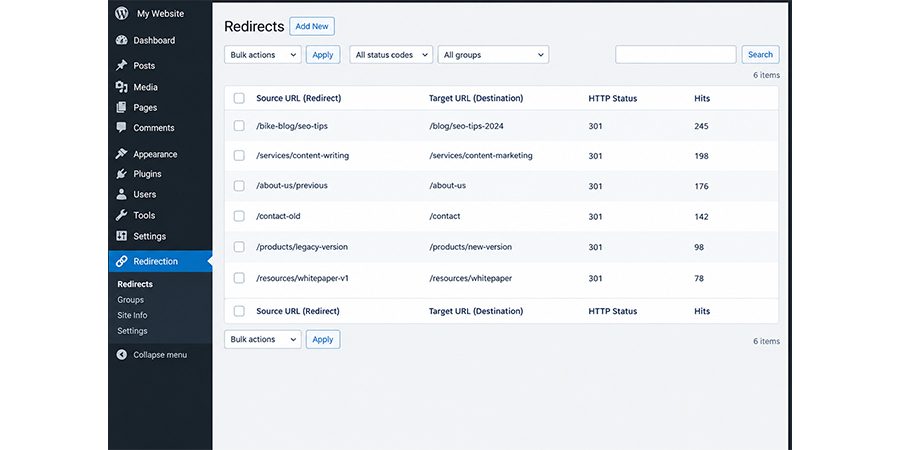
Once you do content consolidation successfully, you should now redirect URLs properly. When you replace your old page with a strong and relevant resource, a permanent redirect guides users and also search engines to the new destination.
A server-side 301 redirect is indeed the most commonly used option when a URL has moved permanently, or its content has been consolidated into another page. Google also considers permanent redirection a powerful signal that the destination can become a canonical URL.
All you need to do is consider several important steps as follows:
- Always check the retired URL and its replacement.
- Create a permanent redirect from the old URL to the relevant destination.
- Remove the retired URL from the sitemap.
- Update internal links
- Test the redirect
- Check for damaged links or redirect chains.
For instance, if you merge a post,/blog/content-marketing-tips has been combined into /blog/content-marketing-guide. So, you can redirect your former URL to the latter if the new guide replaces its content. You should always avoid redirecting removed content to the homepage.
Make sure the destination offers a perfect replacement for your genuine and original content. If no replacement exists, you should always leave the page as a 410 or 404 response that may be appropriate.
- Use Canonical Tags for Duplicate Versions
Canonical tags play a vital role in helping search engines understand the URL that represents a complete set of similar or duplicate pages. They are specifically useful when the same type of content is accessed through a range of URLs, and you also need to retain those important versions.
For example, an eCommerce website often generates sorting parameters that create different URLs for the same kind of product page.
A canonical tag often reflects the preferred clean URL. In the HTML head, it looks like this:
<link rel=”canonical”
href=”https://example.com/product-page/” />
The above example discovers the preferred URL for the page. You should then replace the sample address with the actual canonical URL.
Google always considers canonical allocation as a powerful signal instead of a complete directive. It may choose a different canonical URL if other evidence also suggests that another version is quite appropriate.
Canonical tags are not completely same as redirect tags — redirects are helpful when retiring a URL permanently, whereas canonical tags are useful when duplicate versions are required to remain accessible.
You should always keep the following important practices in mind:
- You can use absolute URLs in canonical tags.
- Always point duplicate versions towards the preferred URL.
- You should also keep canonical signals consistent with XML sitemaps and internal links.
- You need to include a self-referencing canonical tag on the preferred page.
- You should always point to those pages that are unrelated to an individual canonical URL just because they describe the same topic.
- Check and Reorganize Internal Links
It goes without saying that content consolidation has redefined the way information is managed across a website. If internal links on a website point to outdated URLs or articles, users may face some unnecessary navigation steps. On the other hand, search engines also receive certain inconsistent signals related to a preferred page.
So, you should first crawl your website properly and then examine its internal links. You can find those links that point to URLs that have been redirected, merged, or removed. After this, you can update the relevant links that point to the final destination.
You should not forget to check contextual links within resource hubs, category pages, blog posts, related-content sections, navigation menus, and more. We can take an example here: you post five articles related to a topic like content marketing and link them with outdated articles focused on the same keyword.
So, if you do content consolidation for this article into a “Complete Content Marketing Guide”, you should then update those links that point to a new source directly.
The next important thing you can do is to use anchor text, which should be descriptive and clearly explain what users can find after clicking it. You should always avoid emphasizing those keywords in every link; instead, use natural or contextually relevant anchors that are quite useful to readers.
Besides, you should also focus on reviewing the information architecture of your website. Make sure consolidated resources are easily discoverable with the related articles and relevant category pages.
- Measure Results
So, you have put a lot of effort into content consolidation, right? Well, it’s now the right time to measure results; otherwise, your efforts will go in vain. You need to check whether the changes you made boost user engagement, organic visibility, business outcomes, etc.
It’s a good idea to record a baseline completely for every affected URL. Make sure you include impressions, organic clicks, average position, relevant backlink information, conversions, etc. It allows you to compare your performance before and after consolidation instead of just relying on assumptions as well.
As mentioned several times, Google Analytics and Google Search Console are the perfect tools to check the search performance of any website. So, you should leverage these tools to gather complete information regarding the same. They help you get details of organic landing-page traffic and conversions and thus measure various aspects of performance.
What to Measure to Check Site’s Performance?
Well, you can keep an eye on the following important factors:
- Organic Clicks: Check whether the consolidated resource attracted more visits.
- Impressions: It helps you understand whether the page is visible for a wide range of queries.
- Average Position: It helps you understand the improvements in ranking for the targeted queries.
- Click-through Rate: It indicates whether users click on the page when it appears.
- Conversion: You need to determine how better the page converts web traffic leads and sales through analyzing its overall conversion rate and also numbers of conversions generated.
- Indexing and Redirects: It helps you understand whether the preferred URLs are indexed properly.
How To Prevent Content Overlap in the Future?
Resolving content overlap is not the only solution. It’s crucial to prevent it in the future to save your valuable time. You can implement the following important practices to make your site fully clean and focused:
- Schedule a Regular Content Audit
We already discussed how to conduct an audit for your website. But doing it only once will not help you in any way. The main reason is that new posts often keep getting added. So, you should do it on a regular basis to get the most out of it. You can schedule a fixed time, preferably every three or even six months, to analyze your content.
- Define Content Ownership
Content often gets messy, especially when two writers cover the same topic even without knowing it properly. You can avoid this scenario and then assign every important content or topic area to one team. They will be responsible for approving new ideas in their area, updating their old pages, and also making an important decision on whether a new post is really required.
- Create a Keyword-to-URL Map
When it comes to a keyword-to-URL map, it’s just a sheet that highlights details about keywords that pages target. Every major keyword often gets one page only. No sharing. Before you plan to craft any new article, you should always analyze the map. If you find that any keyword is already used, you can update your existing page rather than writing a new one.
- Maintain Central Content Inventory
Content inventory serves as a main list of all pages your site includes. It should include URL, title, topic, main keyword, publish date, last update date, etc. You should keep it in one shared place to let the team visualize it easily. It’s advisable to update the inventory every time you publish, remove, or merge a page. You can make your list current to discover similar content in minutes rather than hours.
- Check Pre-Publication Overlap
This should be your final step in your entire publishing process. Before you make your post live, you should always ask a couple of important questions as follows:
- Do you have a page on the same topic?
- Does this page target the same keyword you already leverage?
- Will it answer the same search intent as another page?
If you find the same topic that appears during search, you need to change the angle and then add some new content or also enhance your old pages.
Some Common Content Consolidation Mistakes to Avoid
Content consolidation works effectively to improve the ranking of your website. But it is only possible when you do it with proper care and avoid certain mistakes. We have described some of these mistakes along with their respective solutions:
- Redirecting Outdated URLs to Homepage
A large number of people often send every past URL to the homepage since it feels easy and fast. But search engines often consider it a “soft 404. This mainly reflects that the redirect passes little or even no value. Visitors also often get confused when they access a page that is not related to what they clicked on.
Solution: You can redirect your old page to the new and relevant page through a 301 redirect. If you don’t find any close match for your page, you should select the nearest category or also the topic page instead. You should always think about whether readers find the same thing they expect.
- Keeping Outdated Internal Links
After completing the content consolidation process, your website can still link to the past URLs. These links tend to go through redirects, which can slow page loading speed and thus waste your crawl budget as well. Over time, long redirect chains weaken your SEO signals as well.
Solution: You should update internal links on every page of your website to ensure they point straight to a new page. Besides, use crawlers including Sitebulb or Screaming Frog to discover those links that use old URLs. You can fix them in one go and crawl them again for confirmation.
- Consolidating Low-Traffic Pages With Niche Relevance
One thing you need to understand is that every page that has low traffic is certainly not bad. Though they attract only a limited audience, these get targeted audiences who are often all set to buy or even take the required action. You can combine them into a broad article, which causes you to lose the special importance.
Solution: You should always look beyond traffic numbers and focus on backlinks, conversions, keyword ranking, and engagement. If you find a niche page serves a clear purpose, you should then keep it and turn it into a strong supporting page that links directly to your core guide.
- Removing Useful Information During a Merge
When you combine different pages of your website, it’s indeed convenient to remove some text to make the page less verbose and thus easy to understand for readers. But there may be some areas where you might delete important examples, useful details, data, etc., it affects the quality of your final page. Besides, you can also lose those keywords that brought a vast amount of traffic earlier.
Solution: You can make a list by including important parts of every page before you start. Make sure you keep unique tips, answers, facts, images, etc., for certain common questions. You need to remove only those parts that are repeated or even outdated. The emerging page should be better and more complete compared to any individual page it replaced.
- Merging Pages Based on Primary Keywords
It’s common that two pages have different search intent, though they share the main keyword. One page may be based on educating beginners, whereas the second one may compare products. So, when you merge these pages just because of keyword matches, it often confuses readers and also hurts the rankings of both pages.
Solution: You need to analyze the search intent first. It’s a good idea to search keywords on Google and check the types of pages that appear. After this, you can merge pages only when they truly answer the same requirements. If you find different intent, you should then keep both pages and then adjust each of them to target.
FAQs
Ans: You can prioritize content consolidation with limited resources in several ways, such as discovering pages that have overlapping topics, declining traffic, keyword cannibalization, and fewer conversions. You can leverage tools such as Google Analytics and others to analyze performance and then consolidate high-impact pages first according to potential SEO gains and the required effort.
Ans: Well, content consolidation generally takes 4 or, at most, 12 weeks to deliver measurable outcomes. The time period depends on several factors like redirect implementation, website authority, crawl frequency, content quality, competition for targeted keywords, etc.
Ans: Yes, content merging improves the topical authority of any website by combining different overlapping pages into comprehensive resources. It improves content relevance and minimizes keyword cannibalization and thus allows search engines to understand the expertise of any website based on specific topics.
Ans: You can handle content consolidation for multilingual websites by consolidating duplicate content separately within every language while preserving localized and relevant pages. You can maintain language-specific URLs, hreflang tags, redirect updated pages, update internal links, etc., to their relevant language.
Ans: Yes, it’s necessary to use content consolidation during website migration, especially when numbers of pages overlap or offer outdated information. It works effectively in preserving complete SEO value, enhancing user experience, minimizing keyword cannibalization, and maintaining a clear website structure.
Conclusion
Content consolidation enables businesses to boost content quality, minimize unnecessary overlap, and make your website more organized. Meanwhile, the main result often relies on reviewing performance data, search intent, preserving important information, implementing redirects, internal link updates, etc. You can perform regular audits and content planning clearly to prevent any future overlap.
Partnering with an experienced content marketing company simplifies the entire process in several ways. These mainly include strategic consolidation, data-driven audits, ongoing performance monitoring, etc. They help you improve online visibility of your brand in search engines and ensure every page serves a clear purpose.

